Podcast websites - everything you should know about it
Producing a good-quality podcast is essential in podcasting. While the most challenging part (especially for beginners) is marketing - reaching people who want to hear you. One of the most powerful tools that helps you to spread the word is your podcast website. We have covered the benefits of having a podcast website. In this post, we will cover podcast websites in all aspects:
- Podcast website templates do’s and don’ts.
- Essential features of podcast websites.
- Free podcast websites that you get with your podcast hosting platform.
- Pros and Cons of different website builders.
We’ve written this guide keeping in mind that it will be your one-stop resource for your podcast website.
Podcast website templates
It’s not enough just to build a simple static website for your podcast, expecting that it helps you with growing your listenership. Instead, it’s crucial to have a well-designed podcast website because a professional and good-looking website allows you to form a good impression on your potential listeners and fans.
Podcasters are content creators, and it gets complicated to establish and design a good-looking website for most of them. However, developing a website from scratch is never an option, as there are plenty of excellent podcast website templates you can use as an entry point and customize to fit your needs.
Let’s analyze and discuss some great (and not-so-great) podcast website templates.
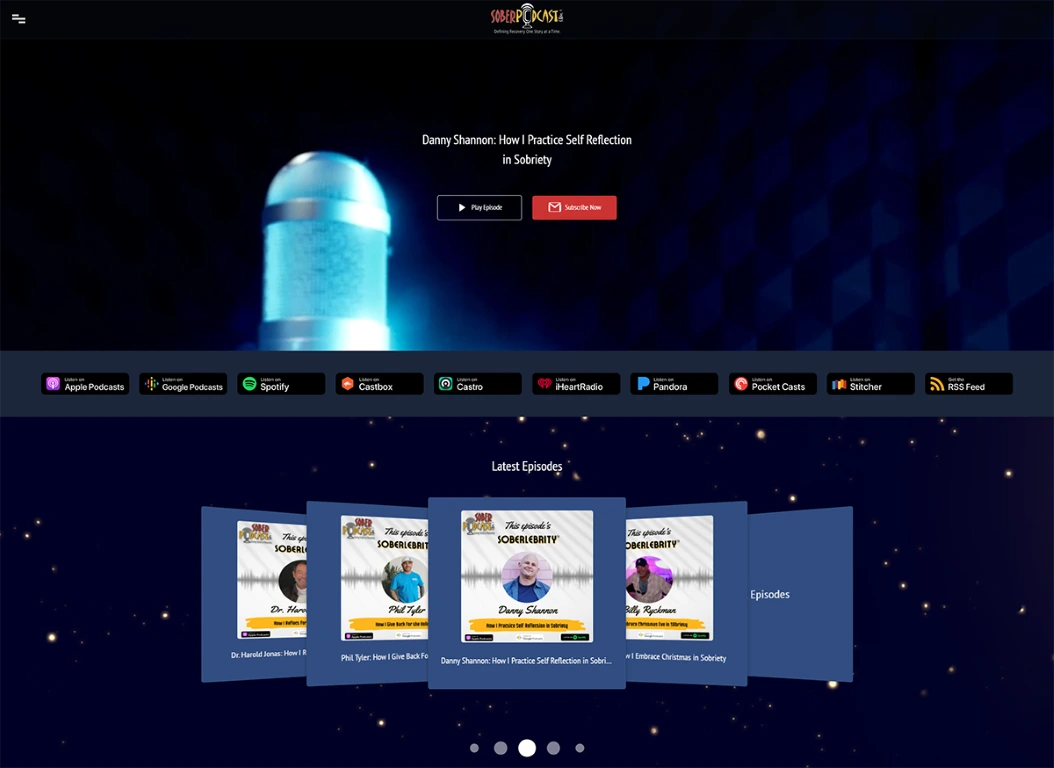
Sober Podcast
Website: https://soberpodcast.com
Website builder: OnPodium
Template: Parallax Dark
Why we like this website template
- Minimalistic design with a dark color scheme and big background video makes a solid first impression right after the visitor comes to this website
- All platforms where the podcast is available are listed above a fold and are easily accessible to your website visitors and your podcast listeners.
- The most recent episode listed at the top grabs attention and gets more listens.
- Subscribe - one of the most important CTA (Call To Action) - is also clearly visible. The eye-catching red button on a dark blue background makes effective contrast.
- A responsive design allows looking perfect on any screen size or device.
- The website has all the important pages: episode pages, contact page, subscribe page, reviews page, and donation page.
- The website is SEO optimized and gets a 94% performance score on GTmetrix.
What could be improved
- The podcast has white-background episode images, so we think that white background and brighter color scheme would look perfect.
- Background video with microphone is too generic and could be more specific to the podcast niche.
- Show notes are already great on episode pages, but it would also be nice to have transcripts added there.
The Addiction Podcast - Point of No Return
Website: https://theaddictionpodcast.com
Website builder: OnPodium
Template: Smooth
Why we like this website template
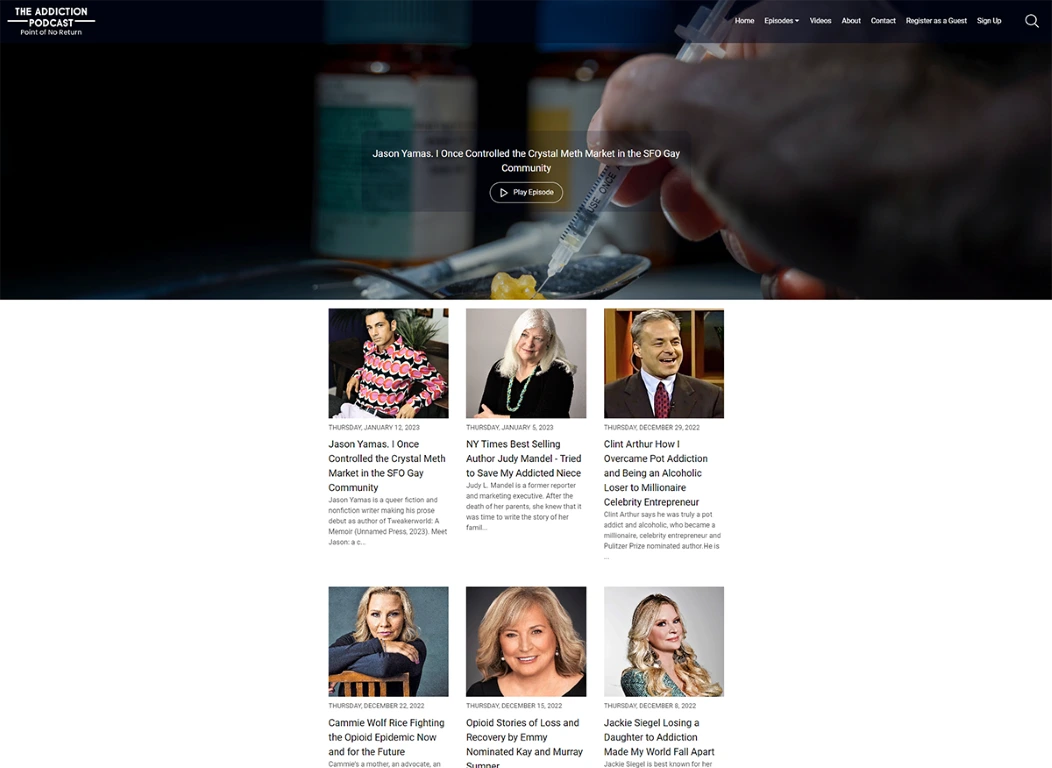
- Clean design, without unnecessary and disturbing elements, allows seeing the latest episodes.
- Each episode page has a YouTube video embedded below the show notes.
- The big header image is related to the podcast niche, so new website visitors can better understand what the podcast is about.
- The website looks great on any screen size because of the responsive design.
- The website has an episodes page and a videos page - it’s nice to have both versions of your episodes. Website visitors can choose how they consume your content.
- The website is SEO optimized and gets a 98% performance score on GTmetrix.
What could be improved
- It would be helpful to have podcast platforms listed on the homepage. Websites visitors could choose their favorite app to listen to the podcast.
- There are no reviews on the website. Having reviews imported to your website helps to build trust with new listeners.
The Midnight Train Podcast
Website: https://www.themidnighttrainpodcast.com
Website builder: WIX
Template: Thunderbolt
Why we like this website template
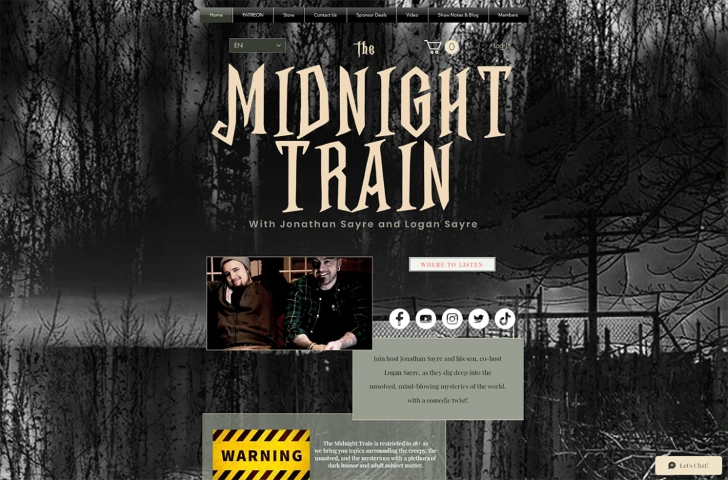
- A big parallax background image makes the website unique and creates an appropriate atmosphere.
- The podcast name is visible as it appears in giant letters on the top of the homepage.
- There is a review section at the bottom with some reviews listed.
What could be improved
- The design looks chaotic. There are too many buttons, content boxes, and noise on the homepage and other pages.
- There are no dedicated episode pages - it’s critical for SEO, and this podcast loses such a significant benefit by having only an embedded player on their website.
- Social icons and links appear on the top, while podcast platforms are at the bottom. It should be vice versa because podcast platforms are more important.
- The website looks broken on smaller screens and mobile phones. It’s a critical issue that should be fixed, as more than 66% of traffic comes from mobile phones.
- The website performance score on GTmetrix is only 61% - it’s not good for SEO and user experience.
- The website is available in several languages - it would be a benefit, but the problem is that it doesn’t work correctly on this website, and after switching languages, not all texts get translated and remains in English.
Pull Hook Golf
Website: https://pullhookgolf.com
Website builder: OnPodium
Template: Parallax Dark
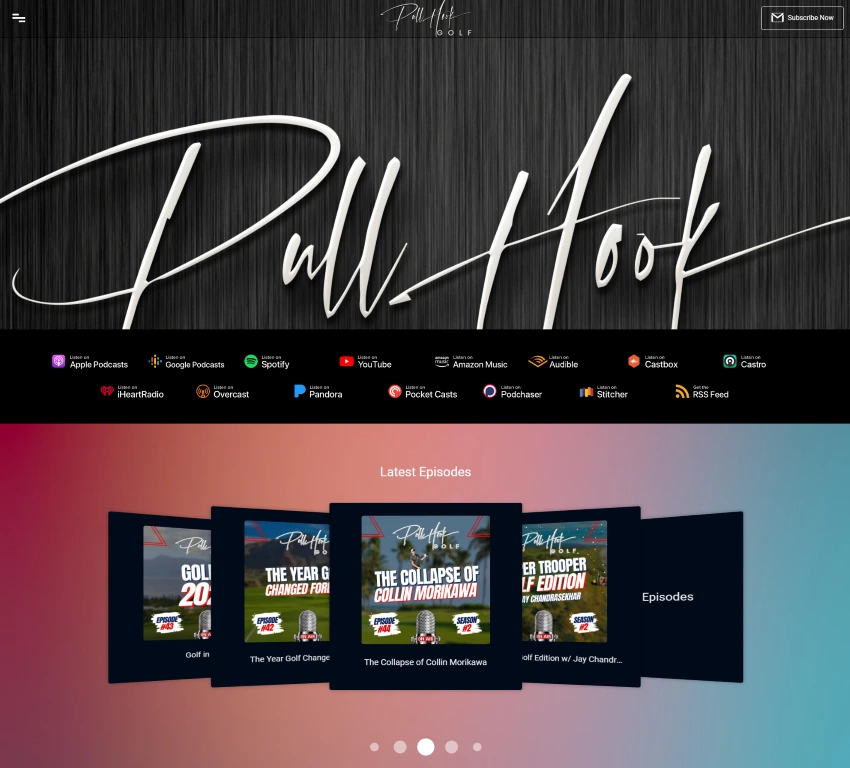
Why we like this website template
- The website is responsive and looks perfect on all devices.
- A vivid color scheme and dark parallax background with podcast branding create a solid impression from the first seconds.
- All platforms where the podcast is available are visible above a fold, so podcast website visitors can easily pick the platform they prefer.
- The most recent episodes are listed in a lovely carousel below podcast platforms.
- Subscribe appears on the “most hot” area - top right of the website. It helps to grow a podcast email list effectively.
- The website has all the essential pages: episode pages, contact page, subscribe page, reviews page, and donation page.
- Pull Hook Golf podcast is also available on YouTube - all videos are listed on the homepage as a slideshow. It makes it easy to jump to YouTube and watch episodes for listeners who prefer podcast video format.
- The website is SEO optimized and gets a 95% performance score on GTmetrix.
What could be improved
- The main header image looks almost identical to the podcast logo in the header. It would be better to have another background image, such as a golf player playing golf or something similar.
- The show notes should be more extended. It would be better to have extensive show notes + transcripts - that would be good for better SEO.
The Simplifiers Podcast
Website: https://thesimplifiers.com/thepodcast
Website builder: WordPress
Template: Salient (Powered by WPBakery Page Builder)
Why we like this website template
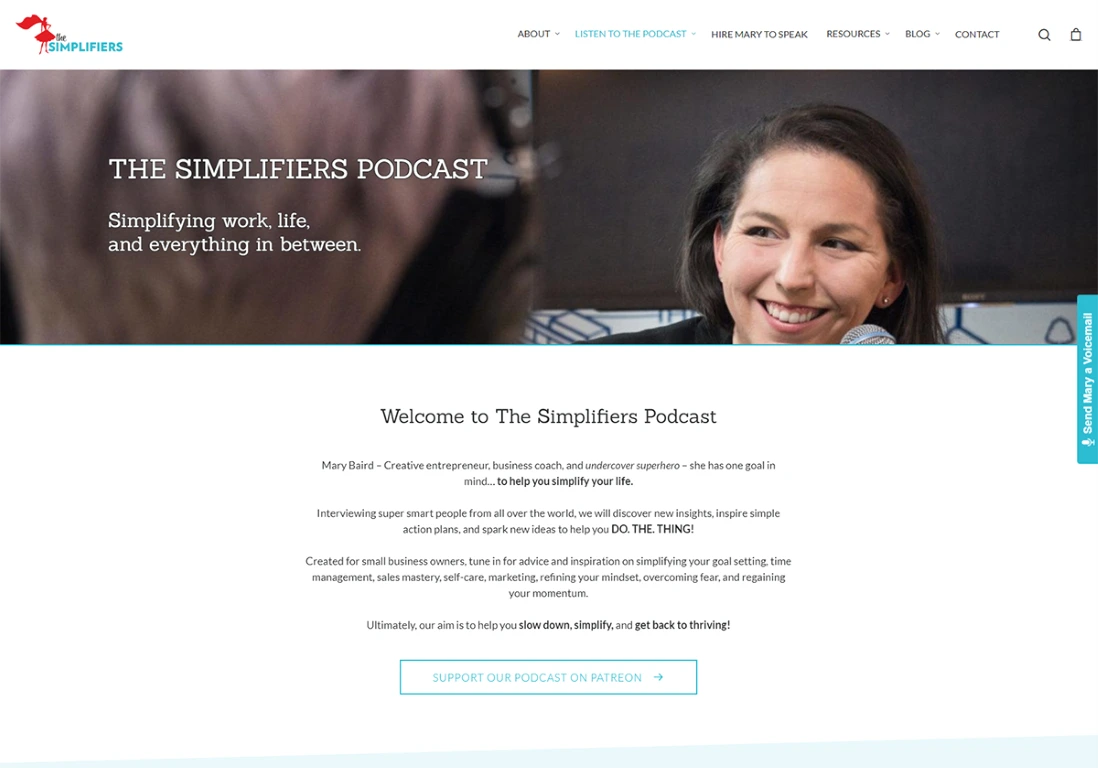
- Each episode has a dedicated episode page with great show notes.
- The podcast name is visible as it appears in giant letters on the homepage.
- All platforms podcast is available on are listed on the homepage.
- The website has SpeakPipe plugin installed, so there is the possibility to leave a voice message.
- The website looks good on all screen sizes.
What could be improved
- The design needs to be more professional.
- It would be better to have a dedicated donations page on the website with a Patreon link and other options instead of a Patreon link. People may want to donate to the podcast, but you shouldn’t be forced to create another account on one more platform like Patreon, and it’s better to offer multiple choices.
- Episodes appear on the homepage within the embedded player and also as episode page teasers below. Having a player is useless at this point. Episodes are duplicated and take up unnecessary space on the homepage.
- The website performance score on GTmetrix is only 60% - it should be improved.
Congratulations with Chris D'Elia
Website: https://www.congratulationspod.com
Website builder: Squarespace
Template: Custom
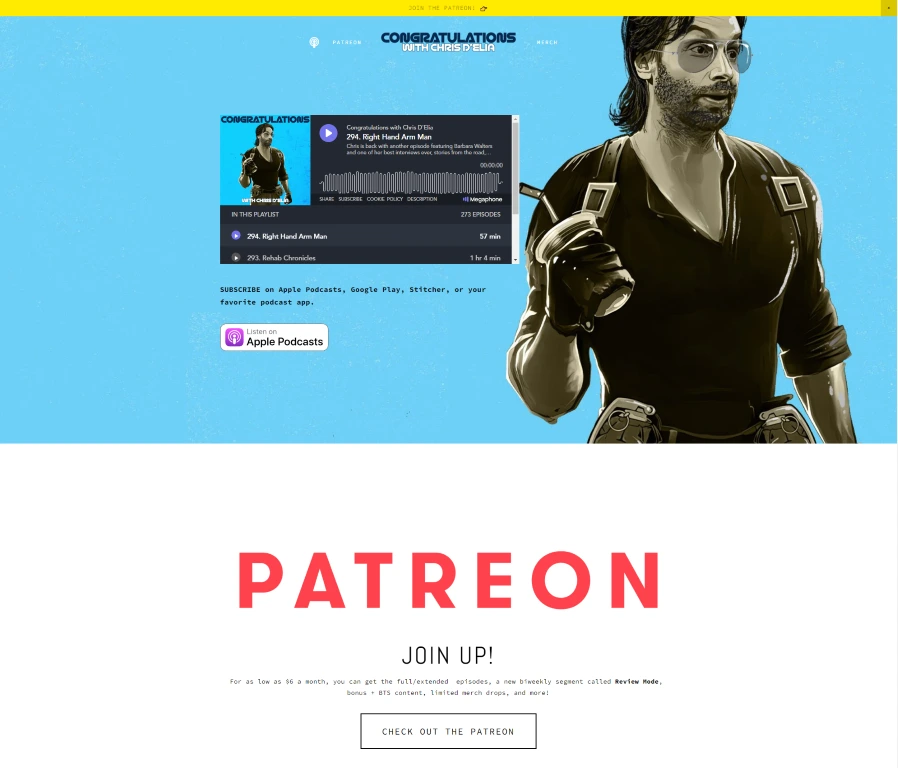
Why we like this website template
- Each episode has a dedicated episode page with great show notes.
- The podcast name is visible as it appears in giant letters on the homepage.
- All platforms podcast is available on are listed on the homepage.
- The website has SpeakPipe plugin installed, so there is the possibility to leave a voice message.
- The website looks good on all screen sizes.
What could be improved
- The design needs to be more professional.
- It would be better to have a dedicated donations page on the website with a Patreon link and other options instead of a Patreon link. People may want to donate to the podcast, but you shouldn’t be forced to create another account on one more platform like Patreon, and it’s better to offer multiple choices.
- Episodes appear on the homepage within the embedded player and also as episode page teasers below. Having a player is useless at this point. Episodes are duplicated and take up unnecessary space on the homepage.
- The website performance score on GTmetrix is only 60% - it should be improved.
Head Shepherd Podcast
Website: https://headshepherd.com/
Website builder: OnPodium
Template: Vivid
Why we like this website template
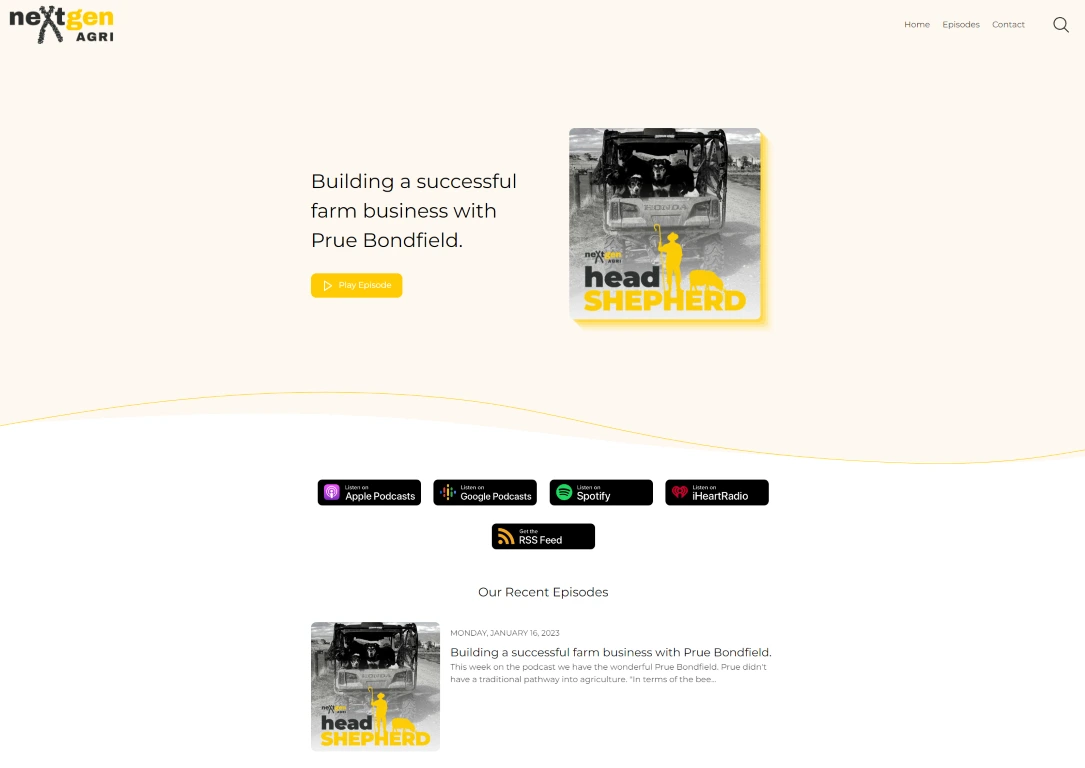
- Minimalistic design looks very lightweight, podcast branding colors match with logo and podcast art image
- Podcast platforms listed in the center of the website so, that website visitors can’t miss it.
- The most recent episode appears in the header along with listen button that allows visitors to listen to it right on the website's built-in player.
- The website looks perfect on all devices and all screen sizes.
- The website has only two main pages in the header: episode pages and contact page.
- Great show notes that boost organic traffic from Google.
- Possibility to search for episodes.
- The website is SEO optimized and gets a 99% performance score on GTmetrix
What could be improved
- The website could look richer in content if episodes had their custom image.
- It would be perfect to have not only show notes but also transcripts on each episode page.
Must have podcast website features, elements, and pages
Podcasts are very distributed media, so it’s recommended to have your podcast available on as many platforms as possible and establish a social media presence. Some podcasters choose one platform to spread the word about their show. The most popular options are Apple Podcasts and Spotify. This situation is kind of a misunderstanding: everybody recommends you have a podcast on many platforms, it helps to grow your audience, but when you share a new episode, you’re going with Apple Podcasts or Spotify only.
So how to unify all platforms and have everything in one place? The answer is simple - establish a podcast website, and you will have all the platforms, social media, etc., in one centralized spot.
There are tons of different website builders, design and development agencies, or freelancers if you’re looking for cheaper options, but the thing is that podcast websites come with some specific features. It’s not recommended to have a static website that you update each time when releasing a new episode, it’s time-consuming and not an efficient way to do it.
So let’s jump and see the key elements and features of podcast websites.
Automated episode pages
It’s an essential feature that saves time. Your website should always stay in sync automatically when you release new episodes. Having this feature allows you to keep your website up to date effortlessly.
SEO
Search engine optimization is vital to growing your listenership - if your website is SEO optimized, Google will index it, and you will start getting organic traffic for your main keywords. A search engine-optimized website could become the central funnel to grow your show. To squeeze the most benefits, you should have good show notes describing your episode and the recommended length is at least 400 characters. You can go the extra mile and add transcripts to your episode pages. Doing so will boost your rankings on Google and other search engines.
Having a blog on your website is another way to add more “juicy” content that search engines will index, but it comes with one drawback - it needs additional effort, as you need to publish blog posts time after time.
SEO is not only about content on your website. It’s also about loading speed. Many website builders claim that their websites are very fast, but sometimes it’s just marketing - you can quickly check how well a website performs with free online tools like GTmetrix.
Another vital concern if you’re just starting a new podcast is to do an investigation regarding your podcast name. Before deciding on a name, try to search for that name on Google and Apple Podcasts. Probably there are already podcasts (or maybe even some big brands) named the same as your podcast or very similar, using the exact keywords. If you find that the podcast name “is in use,” try to think about some alternative names. Otherwise, you will get unwanted competition in terms of SEO.
- Embed your YouTube episode videos within your show notes on your episode page.
- Create a dedicated page for YouTube videos, and have all videos on your website
Email list
Growing your email subscriber list helps to stay in touch with your audience. Add an email subscription form to your website and collect email addresses from your visitors. You can reach out to them by sending updates and notifications about new episodes. It’s even better if notifications about new episodes happen automatically. Specialized website builders like OnPodium platform have a new episodes notification feature built-in.
Contact form
A contact form + contact page is a must-have, especially for your new potential listeners. Probably your existing fans already have your email and social media - they know how to reach out to you. When it comes to new, potential listeners or even some businesses who probably want to advertise on your podcast - the contact form is the main way they will approach you.
YouTube
Is your podcast on YouTube? If you’re hosting only an audio-based podcast, you should consider repurposing it and establishing a YouTube channel. Keep in mind that YouTube is another search engine, and YouTube was getting more serious about podcasts - particularly after Spotify entered the space with its support for video podcasts. As soon as you have your podcast on YouTube, your next step should be combining YouTube videos with your podcast website. There are several ways to do that:
Onsite podcast player
It’s vital to have a built-in podcast player on your website or an embedded player available on each podcast hosting platform. Every new visitor that comes to your website is a potential listener and your fan. You should provide a possibility to listen to your episodes directly on the website, and if they are engaged and interested in your content, most likely, they will go to the platform that they use and will subscribe to your podcast.
Blog page
As it was mentioned before, having a blog page and posting blog posts (at least one blog post per week with more than 600 words) could help you to get more traffic from Google. It happens naturally because you will write posts about your podcast and your niche - so you will have more content with your target keywords. Google will index that content, and you get more clicks.
Custom pages
Some core pages should be presented on any podcast website: home page, episodes page, contact page, about page, and reviews pages. Eventually, you will need additional pages, like your guest's page, sponsors page, or page for adding some behind the scene moments. Therefore, before you decide which website builder to choose for your podcast, ensure that you can add custom pages effortlessly.
Reviews page
Reviews are a must-have. You ask why? Here are the answers:
- Podcast reviews attract new listeners.
- Podcast reviews help your podcast to rank better on platforms like Apple Podcasts, Spotify, etc.
- Podcast reviews build your reputation and trust.
- Reviews are just another way to engage with your listeners and are a great thing for getting feedback.
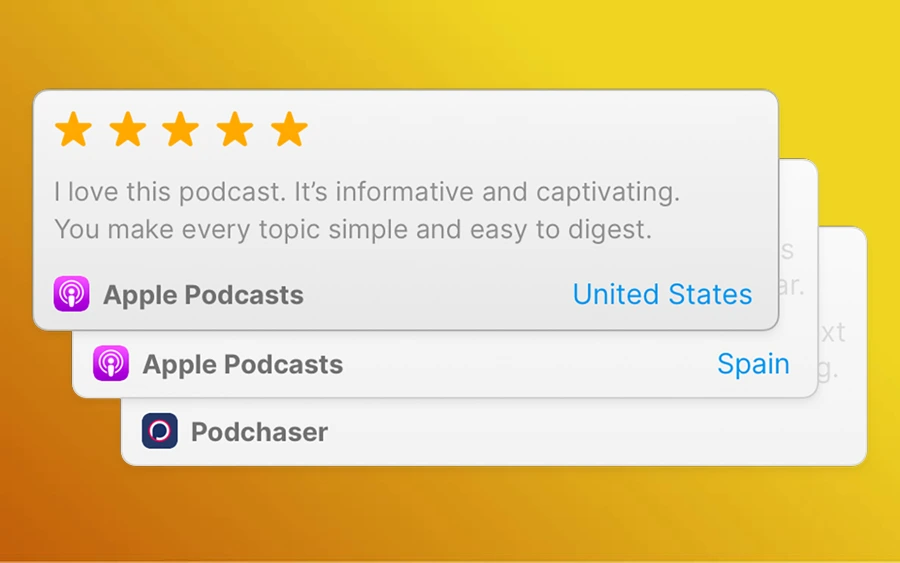
Platforms like Apple Podcasts have reviews functionality built-in. The same should be on your website, you should be able to import your existing reviews easily into your website. Also, it’s recommended to have the possibility to leave a review directly on your website. And don’t forget to add your best reviews on your homepage.
Websites provided by podcast hosting
Many podcasters ask the same question again and again - do I need to have a dedicated website for my podcast as I already have one on my podcast hosting platform, and it’s FOR FREE?
There are plenty of questions like that appearing on social media again and again.
So, let’s discuss the websites that you get with your podcast hosting provider. The first thing is that, in most cases, you do not get a fully-fledged website. It’s just a simple page that lists your episodes and allows you to add your podcast title, a short description, and a podcast art image. Most of the features that we covered above are not available, and it doesn’t make sense to add that page under a custom domain and use it as a marketing asset to grow your podcast.
Customization options are minimal, it’s not possible to customize that page so that it fits your brand - thousands of podcast websites on podcast hosting platforms look the same and don’t help you to stand out.
There is nothing terrible about podcast hosting companies providing these simple pages. Still, the primary purpose of any hosting provider is to provide reliable hosting for your episode audio files, let you understand how your podcast performs with great analytics, allow you to integrate on different platforms easily, etc. While building and hosting professional-looking websites is a different task.
For a better understanding on what’s the difference between a full-fledged website versus the one you get from your podcast hosting platform, see it in action below:
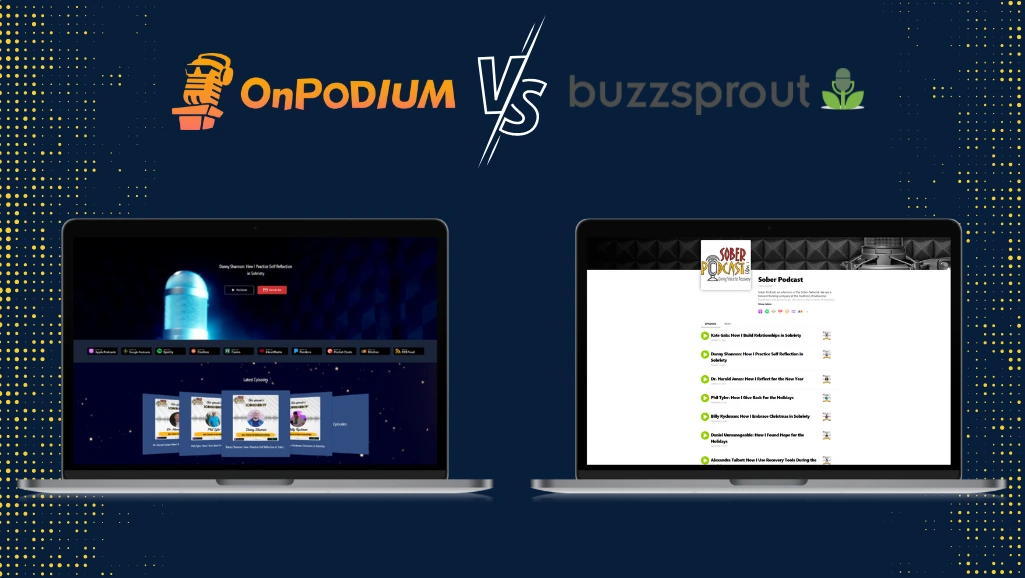
Here are the links if you want to click around: https://soberpodcast.com and https://www.buzzsprout.com/1820094.
If you’re serious about your podcasting journey, you should establish branded, professional, feature-rich website and use it instead of the one-looking cheap that you get from the podcast hosting platform.
Podcast website builders - features, prices, and everything you should know about choosing the right option for you
It could be hard to count all website builders on the internet. There are big players like WordPress, WIX, or Squarespace, small ones, and website builders for different niches like real estate, weddings, education, you name it. The podcasting space is no exception, and there are a few options for podcasters.
It’s not possible to review all existing options, we will cover well-known website builders and those oriented for podcasts. Let’s see which platforms have features we’ve covered above, and let’s see plans and pricing options and if it’s easy to use.
Good user experience and how it easy to use website builder is vital for podcasters, as most of them are not tech-savvy. Podcasting is not easy, it takes much time for planning, recording, editing, and finally, marketing. No one wants to spend their time managing the website, customizing it, adjusting different features, installing plugins, taking care of compatibility issues, and so on.
So, let’s jump into website builders analysis.
WordPress
WordPress is the most popular website builder, it was launched in 2003, so it’s been more than 20 years since this platform has been operating. And to be honest - WordPress is a really powerful and good platform, you can build any website you want with it, but there is one problem with building websites for podcasts. WordPress wasn’t created with podcasters in mind. Because WordPress is so powerful, a big disadvantage comes with this - it’s also complex to use if you are not tech-savvy. There are multiple moving parts that you need to set up correctly and glue together.
The process, in most cases, looks like this:
- Creating an account on WordPress.
- Install a Podcast-Specific WordPress Theme.
- Install a Podcast Plugin.
- Link Your Podcast Hosting Service with the Plugin.
- Upload Your Episodes to WordPress Using the Podcast Plugin.
- Configure custom domain.
Sound complicated? Well, it is. And the steps above are just for establishing your website. It’s an approach in “that you set it and forget it.” You must maintain any upcoming upgrades for your template and plugin, ensure that both are compatible, etc.
Let’s look at pricing.
WordPress Business plan costs you $40 per month, billed monthly for the Business plan. And you need a Business plan because you want to have the possibility to install custom plugins and themes. It’s much more expensive than you pay for your podcast hosting - isn’t it? But this price is not final. You need some upfront investments.
If you want a professional-looking website, you need a professional theme, and it costs additionally. We did some research and found this Resonator - Audio Podcast Theme that looks slick and nice. The price for this theme is $85 + $63.88 for an extended 12 months of support - believe me, you will need it. So it’s $148.88 in total.
When it comes to plugins - don’t be fooled, and don’t pick the cheapest or free plugin. Do your research, try out at least several options and decide which one is the best fit for you. According to podcasters' reviews, SimplePodcastPress is doing great, but if you move forward with this plugin, it’s another $67 to spend.
So to set up and launch your podcast website on WordPress will cost you something around $250 and then $40 monthly to keep it running. Considering that you need to maintain it, and it takes your valuable time, WordPress probably is not an optimal solution for your podcast website.
WIX
Another big player in the website builders space is - WIX. All-in-one website builder that lets you quickly create websites. WIX builder is popular among entrepreneurs and small business owners, but is it a good fit for podcasters?
Again, the main problem is that WIX is built for everyone. It allows you to build any type of website, including podcast websites, but when we come into more details, we find that themes are minimal, the built-in audio player is very fundamental, and it’s not so easy to customize the pixel-perfect website, despite the fact, that WIX has powerful and easy to use drag-and-drop builder.
How about WIX pricing? Let’s see, at their pricing page:
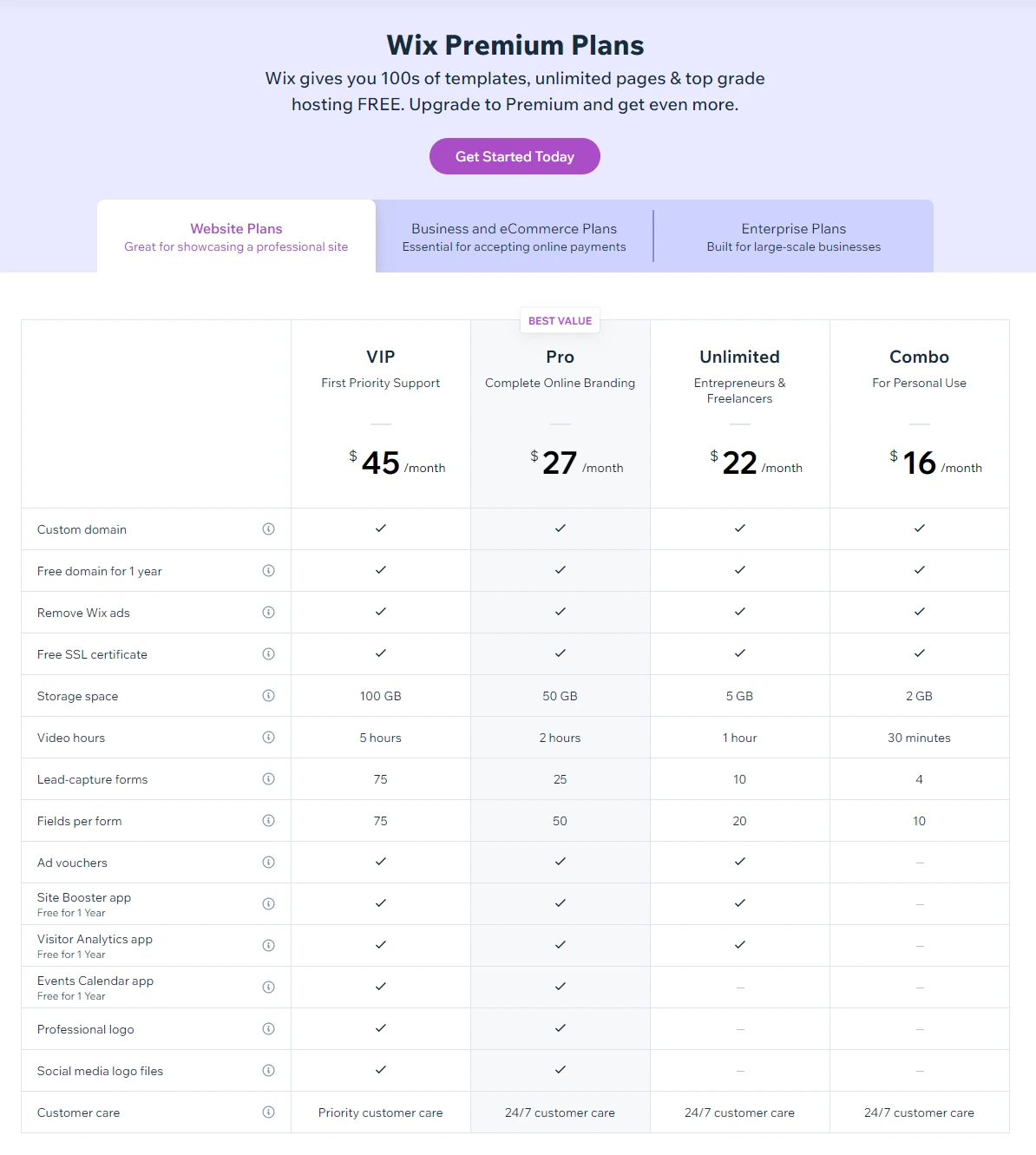
So, as you can see, Connect Domain and Combo are minimal plans, and WIX recommends these plans for Personal use. Your podcast website definitely will not be for personal use, you’re going to take your podcast to the next level with your new website. So the best fit would be to move forward with the Unlimited plan that costs $22 / month. Don’t let the name trick you, Unlimited, doesn’t mean that this plan is unlimited - there are limitations: only 10 Lead-capture forms, a max of 20 fields per form, and others.
Squarespace
Squarespace is straightforward to use, has a great and powerful drag&drop builder, and offers you several ready-made podcast templates. On the other hand, limited customizability was considered the most significant disadvantage. It looks like Squarespace nailed and polished its marketing and sales strategy: templates look nice, onboarding is easy, and changing a few things is very easy using a pretty intuitive (at least from the first sight) drag&drop tool. But, there is something about it… It could become a nightmare when you start to customize some more advanced options, trying to add podcast-specific things, like plugins or embedded players.
And like any big player, their customer support is nothing fast and helpful. Having millions of users, and hundreds of support requests per minute, don’t expect to get any fast and effective help when you will struggle with your Squarespace website.
You can check their existing customer reviews online, and you will find that the disadvantages we’ve covered above are genuine.
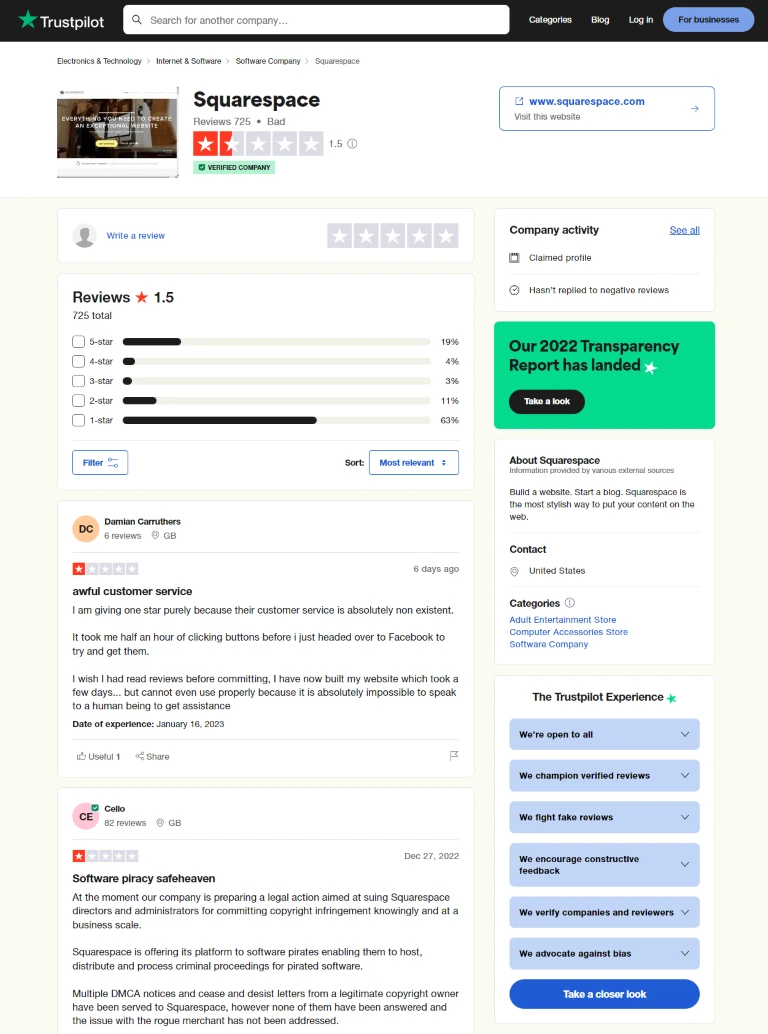
We’ve covered the main points of all three most prominent website builders, it would be too much to cover it in detail, so we touched only on points that we think are important for podcasters. You can start from those points and continue the investigation, as there is plenty of information about every website builder. How to make the right choice?
- Play around with every platform, and try to build the first iteration of your podcast website. Measure your spent time.
- As soon as some basic version of your website is completed, try to add some more advanced things - try to embed your podcast player, or try to create a custom page. Again, measure your spent time.
- As soon as you start struggling at any point - reach out to their support - check if it’s just a dummy robot asking dumb and annoying questions or natural person gets back to you. How fast are you able to get answers and support? Support is an essential aspect before choosing any platform that you will be using.
- Episode automation. Ensure that you can have episodes on your website on auto-pilot. You don’t want to go to your website hosting platform dashboard and add episode pages manually each time you publish a new episode.
We discussed general-purpose website builders, let’s see which website builders focus on the podcasting niche only. You can easily find using a Google search that there are three leading players: OnPodium, Podpage, and Podcastpage.
All 3 website builders were launched several years ago, at a very similar time - OnPodium (previously known as Podsite) was launched just before COVID in November 2019 and was the first website builder oriented to podcasters.
A bit later, in early 2020, Podpage launched, and Podcastpage launched in the Summer of 2020 - looking at the logo and the website in the early days, there were many discussions that Podcastpage is just a copycat of Podpage.
So, that was a short overview of the history, but it’s much more interesting how those podcast website builders are doing today and the differences comparing them to each other. As every platform covers the most important podcasting features, like automated episode pages, built-in players, and building responsive and SEO-optimized, fast-loading websites, there are still some significant differences. The easiest way to make this comparison is simply to compare these differences side by side in the table.
| OnPodium | Podpage | Podcastpage | |
| Pricing starts at | $9/month | $9/month | $12/month |
| Website hosting | + | + | + |
| Free domain * | + | - | - |
| Custom development * | + | - | - |
| SEO and fast loading * | + | - | + |
| Video backgrounds | + | - | - |
| Parallax templates | + | - | - |
| Multi-Language websites | + | - | + |
| Automated YouTube pages | + | + | + |
| Content Delivery Network (CDN) | + | - | + |
| Apple reviews import | + | + | + |
| Built-in reviews | + | - | - |
| Custom player | + | - | + |
* Free domain - at OnPodium - you get one free domain, and you get it forever. Podpage or Podcastpage don’t offer that, while other platforms like WIX or Squarespace offer free domains, but only for the first year. You can choose your domain name with suffixes such as .com, .net, .org, and more.
* Custom development - keeping in mind that we’re comparing website builders, it’s most likely that sooner or later, you will face the situation when you need something custom that can’t be achieved with a website builder. It could be some custom feature or integration, specific design customization, or even a custom page. OnPodium tackles these questions by offering unlimited custom development (with a Professional plan) at no additional costs. You simply request any custom development - the team behind OnPodium delivers unlimited revisions until you are satisfied with the result.
* SEO and fast loading. Each website builder claims that they build search engine optimized websites, lighting fast and etc. But we did some quick tests, and sometimes it’s just a marketing phrase. You can easily do such a test on your own).
We just visited the “Customer stories” page on Popage and simply took the very first customer success story and checked out a website built for this customer by Podpage - as it should be a showcase of what Podpage can do.
Here is a screenshot of GTMetricx report of that website:
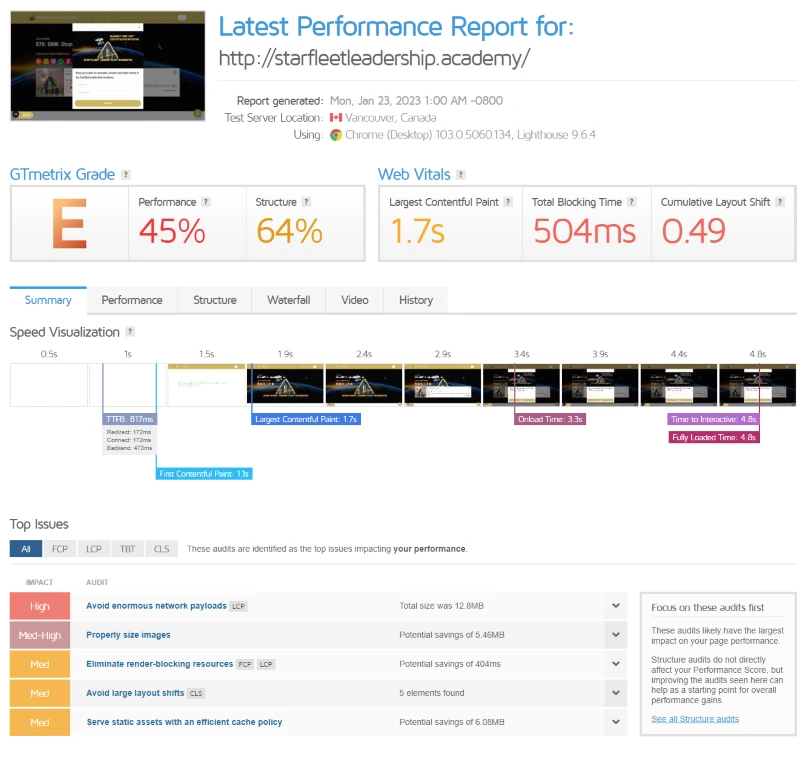
As you can see, the performance is only 45% and this is not good for SEO as loading speed is a critical factor for search engine optimization. OnPodium websites have up to 99% performance scores on GTMetrix. Just a friendly reminder - be aware of loading speed while choosing your website hosting platform.
Conclusion
There is no one best option for podcast website builders. Yes, we build websites here at OnPodium, but we wrote this guide not in the manner that “our website builder is the best, and everything else is bad.” We were trying to be objective and create the ultimate resource for podcasters looking for solutions to build their online presence.
Overall, if you want an easy to to use, feature-rich solution for creating and running your podcast website - we suggest trying out OnPodium.
It comes with some unique things like unlimited custom development (you will feel like you own a dedicated tech team taking care of anything you need along the way and working on your requests with no additional costs on your side).
Another nice thing you will find on any other feature - is a free domain that you get forever and do not pay for it until being with OnPodium as your podcast website provider.
OnPodium has a 2-week free trial, so you don’t risk it anyway. Two weeks will be sufficient time to understand if it’s a good fit for you or not. You will be able to see how our customer support works and what you can expect with our custom development, and get familiar with our intuitive dashboard.
If you have some insights about this article, or you have some things to add that we’ve missed, feel free to reach out by email: at hello@onpodium.com or through our social media accounts.
Further Reading and Resources
If you're building or improving your podcast website, these resources will help you make the most of your online presence:
- 7 Reasons Why Your Podcast Needs a Website — understand why a dedicated website is essential for every podcaster.
- Best Podcast Website Examples and Templates — get inspired by real podcast websites with great design and functionality.
- How to Start a Podcast — a complete beginner's guide covering equipment, recording, editing, and launching your show.
- Episode Landing Page Comparisons — see how OnPodium episode pages stack up against the default pages from major podcast hosts.
Ready to give every episode a page that works for you — automatically? Start free with OnPodium — connect your RSS feed once and every episode you publish gets AI-written show notes, clickable moment hooks (deep-linked to the best parts of the episode), and a professionally designed landing page on your domain. Works with any podcast host.