OnPodium vs Spreaker: The Episode Landing Page Your Listeners Actually See
OnPodium isn't a podcast host. We're the episode landing page layer that sits on top of whatever host you already use — Spreaker included. So this isn't a hosting comparison. It's a comparison of the page a listener actually opens when they tap a link to your episode in a tweet, a newsletter, or a Google result.
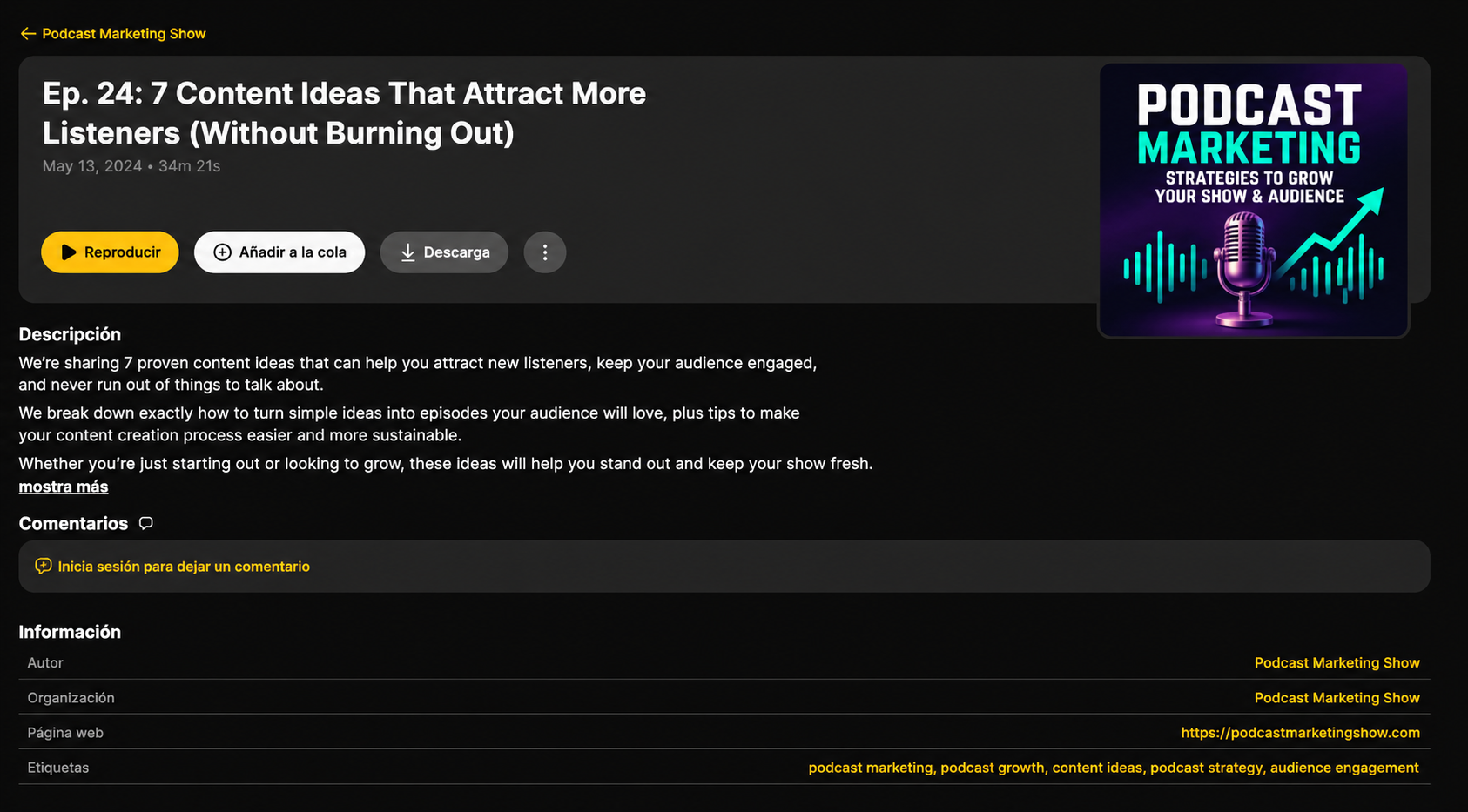
Spreaker gives every show an episode page hosted on spreaker.com with a player, cover art, show notes, comments, and a row of subscribe buttons. It's a social-feeling page with discovery built right into the platform. But it's still a fixed template — no chapter teasers, no deep-link timestamps, no email capture, and the URL lives on Spreaker rather than your domain.
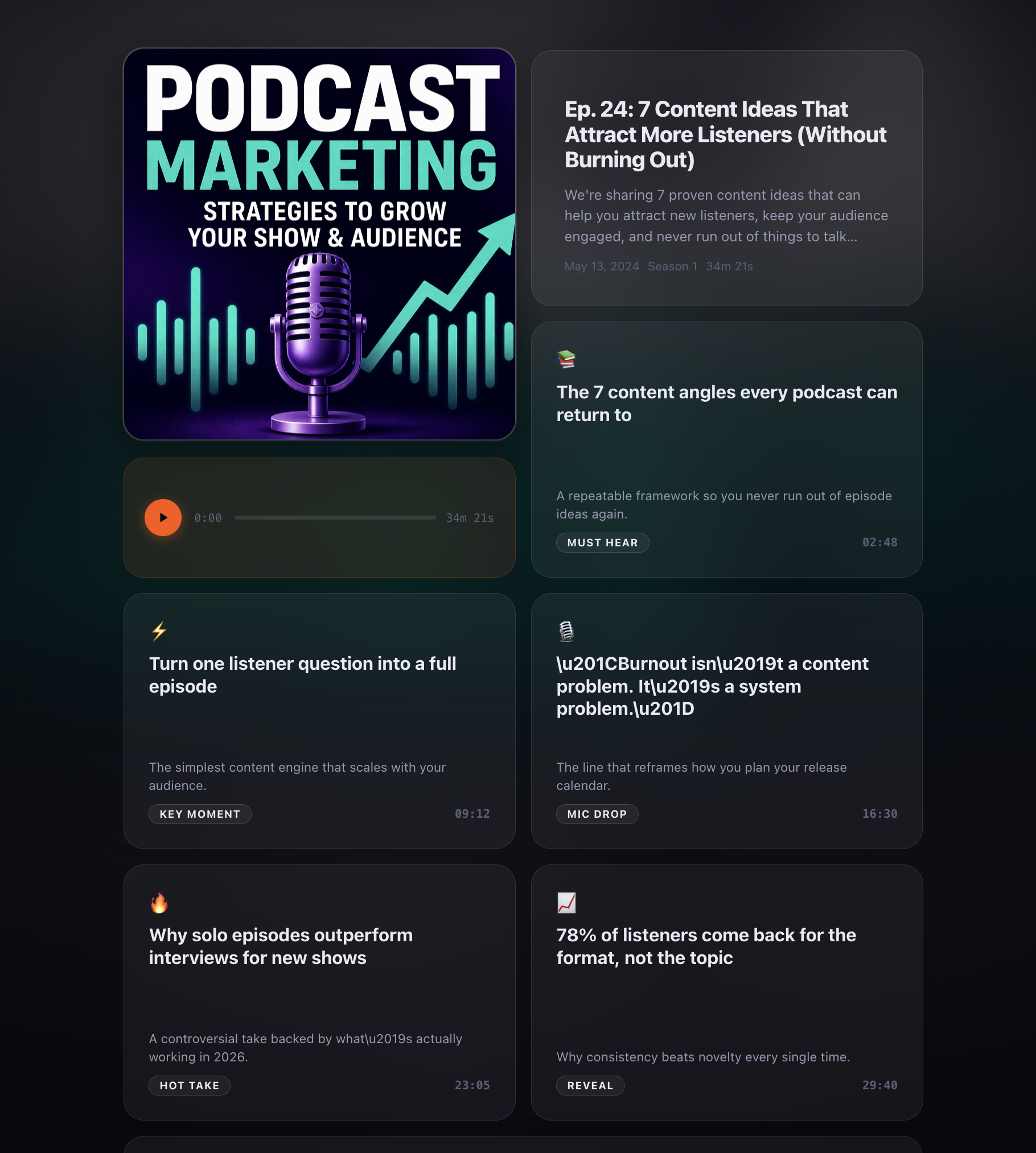
OnPodium turns the same episode into an immersive, branded landing page designed to convert visitors into listeners and listeners into subscribers — without changing your host.
Page-by-Page Comparison
| On the episode page | OnPodium | Spreaker default |
|---|---|---|
| Audio player | Yes — bento layout, branded | Yes — Spreaker-branded player |
| Timestamped chapter / moment teasers | 5 AI-generated, click-to-seek | No |
| Deep-link to a specific timestamp (#t=) | Yes — every teaser shareable | Manual share-from-time only |
| Show notes | Expandable, formatted | Plain text, always-on |
| "Next Episode" tile | Yes — keeps listeners on-page | No |
| Custom domain | Yes — your-show.com/episode/… | Page lives on spreaker.com/episode/… by default |
| Branded look (your colors, art, type) | Full visual control | Theme + accent color only |
| SEO-optimised metadata + JSON-LD | PodcastEpisode schema, OG, Twitter | Basic title + description |
| Email capture on the episode page | Built-in | No |
| Footer branding | Subtle "Powered by OnPodium" | Spreaker branding throughout |
| Works with Spreaker as your host? | Yes — pulls from your RSS | — |
| You have to switch hosts | No | — |
What Spreaker's Episode Page Gives You
The default Spreaker episode page is one of the more community-driven in podcasting. You get a cover-art header, a Spreaker-branded player, your show notes, a comment section, follower counts, and Spreaker-internal discovery widgets. It feels like a social post.
What it doesn't do is work as a marketing page on your own terms. There's no pre-listen hook, no way to share a specific moment outside the Spreaker ecosystem, no “Next Episode” tile that links anywhere besides Spreaker, and no email capture. The page is designed to keep listeners inside Spreaker, not to convert them on your domain.
What an OnPodium Episode Landing Page Adds
OnPodium reads the same RSS feed Spreaker publishes and renders each episode as a bento-grid landing page. The audio player is still front-and-centre, but it shares the page with five AI-generated moment teasers: short, scrollable cards that play the episode from a specific second when tapped. Each teaser is also a deep link, so you can share your-show.com/episode/...#t=492 on social and listeners land directly on the moment.
Below the player you get an expandable show-notes section, a "Next Episode" tile to keep autoplay going, an "All Episodes" link back to your show home, and proper PodcastEpisode JSON-LD plus Open Graph and Twitter card metadata so your link previews look like a magazine article instead of a directory listing.
It runs on your custom domain, in your colors, with your art — and a subtle "Powered by OnPodium" tag in the footer that you can hide on paid plans.
You Don't Have to Leave Spreaker
OnPodium isn't asking you to migrate. Keep hosting on Spreaker. Keep the live broadcasting, the Spreaker Ad Network monetization, the in-platform discovery, the directory submissions. Just point OnPodium at your Spreaker RSS feed and we generate an OnPodium landing page for every episode you publish — past and future — automatically.
From then on, when you share an episode link, you share the OnPodium URL. Your listeners get the upgraded page; your show stays on Spreaker.
Keep Spreaker. Upgrade the Page.
Connect your Spreaker RSS in under a minute and get an immersive, deep-linkable landing page for every episode.
Try OnPodium freeWhen Spreaker's Page Is Enough
If you're still finding your format, post infrequently, and mostly send listeners to Apple or Spotify rather than to a web page, the default Spreaker episode page does the job. There's no reason to add another tool to your stack.
When OnPodium Pays for Itself
If you're actively marketing episodes — embedding them in newsletters, sharing pull-quotes on social, running ads to a specific episode, or pitching guests with a link to their episode — the page itself becomes a conversion surface. Timestamped teasers, deep-link sharing, branded design, and email capture all turn into measurably more plays per visitor.
The Bottom Line
Spreaker is a fine podcast host. For what it costs, the default episode page does what it needs to.
OnPodium is built specifically to be the page you send traffic to. Same episode, same audio, same RSS — but a landing page designed to grow your show. Use both.
More Episode Page Comparisons
See how OnPodium episode landing pages stack up against the default page from every major podcast host.