
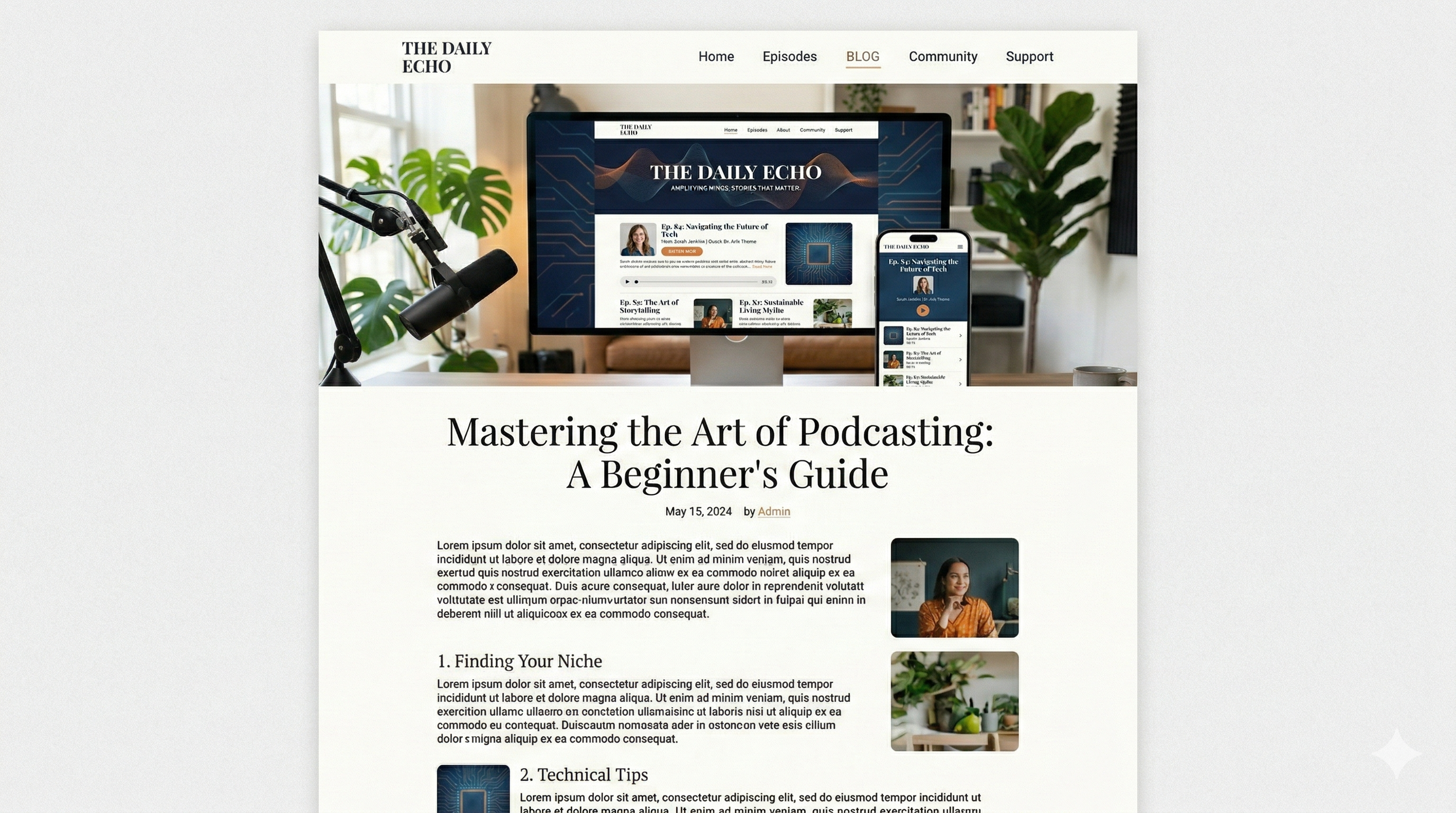
Podcast Website Design: The Complete Guide to Building a Stunning Podcast Site
Your podcast website is the only digital space you truly own. Unlike social media profiles or podcast directories, your website is where you control the experience, the narrative, and the relationship with your audience. And the design of that website — the layout, the visuals, the navigation, the feel — determines whether a first-time visitor becomes a lifelong listener or clicks away within seconds.
In an era where over 4 million podcasts are competing for attention, a generic or poorly designed website can undermine even the best content. Great podcast website design is not about flashy animations or expensive development — it is about creating a focused, visually cohesive, and listener-friendly experience that serves your brand and your audience at every touchpoint.
This guide covers every aspect of podcast website design, from foundational layout principles and homepage strategy to immersive episode pages, mobile optimization, and cutting-edge approaches like scrollytelling. Whether you are launching your first podcast or redesigning an existing site, this is your blueprint.
- Why Podcast Website Design Matters
- Anatomy of an Effective Podcast Homepage
- Designing Episode Pages That Keep Listeners Engaged
- Visual Hierarchy and Layout Principles
- Brand Consistency Across Your Site
- Mobile-First Design for Podcasters
- Building Immersive Experiences with Scrollytelling
- Navigation and Information Architecture
- Embedding and Audio Player Design
- SEO-Friendly Design Decisions
- Designing for Conversion: CTAs and Email Capture
- Performance and Page Speed
- Accessibility in Podcast Website Design
- Tools and Platforms for Podcast Website Design
- Podcast Website Design Examples and Inspiration
- Common Podcast Website Design Mistakes
Why Podcast Website Design Matters
Design is not decoration — it is communication. Every visual choice you make on your podcast website sends a signal to your audience about who you are, how seriously you take your craft, and what kind of experience they can expect. Here is why design is not optional:
- First impressions are decisive. Studies consistently show that visitors form an opinion about a website within 50 milliseconds — before they read a single word. A cluttered, outdated, or generic design triggers an immediate trustdecrease. A polished, intentional design tells visitors they are in the right place.
- Design drives behavior. Where people look, what they click, whether they press play — all of this is shaped by layout, visual hierarchy, and contrast. Good design does not just look nice; it guides your visitors toward the actions you want them to take.
- Professionalism attracts opportunities. Potential sponsors, media contacts, and collaboration partners will visit your website before reaching out. A professionally designed site signals that you take your podcast seriously and are worth investing in.
- Brand differentiation. In a crowded podcasting landscape, a distinctive website design sets you apart. While most podcast sites look templated and identical, a thoughtfully designed site becomes a competitive advantage. Strong podcast branding starts with intentional design.
- Listener retention. A well-designed site makes it easy for visitors to discover episodes, explore your back catalog, subscribe, and return. Friction in design — confusing navigation, slow load times, broken layouts — drives people away permanently.
Anatomy of an Effective Podcast Homepage
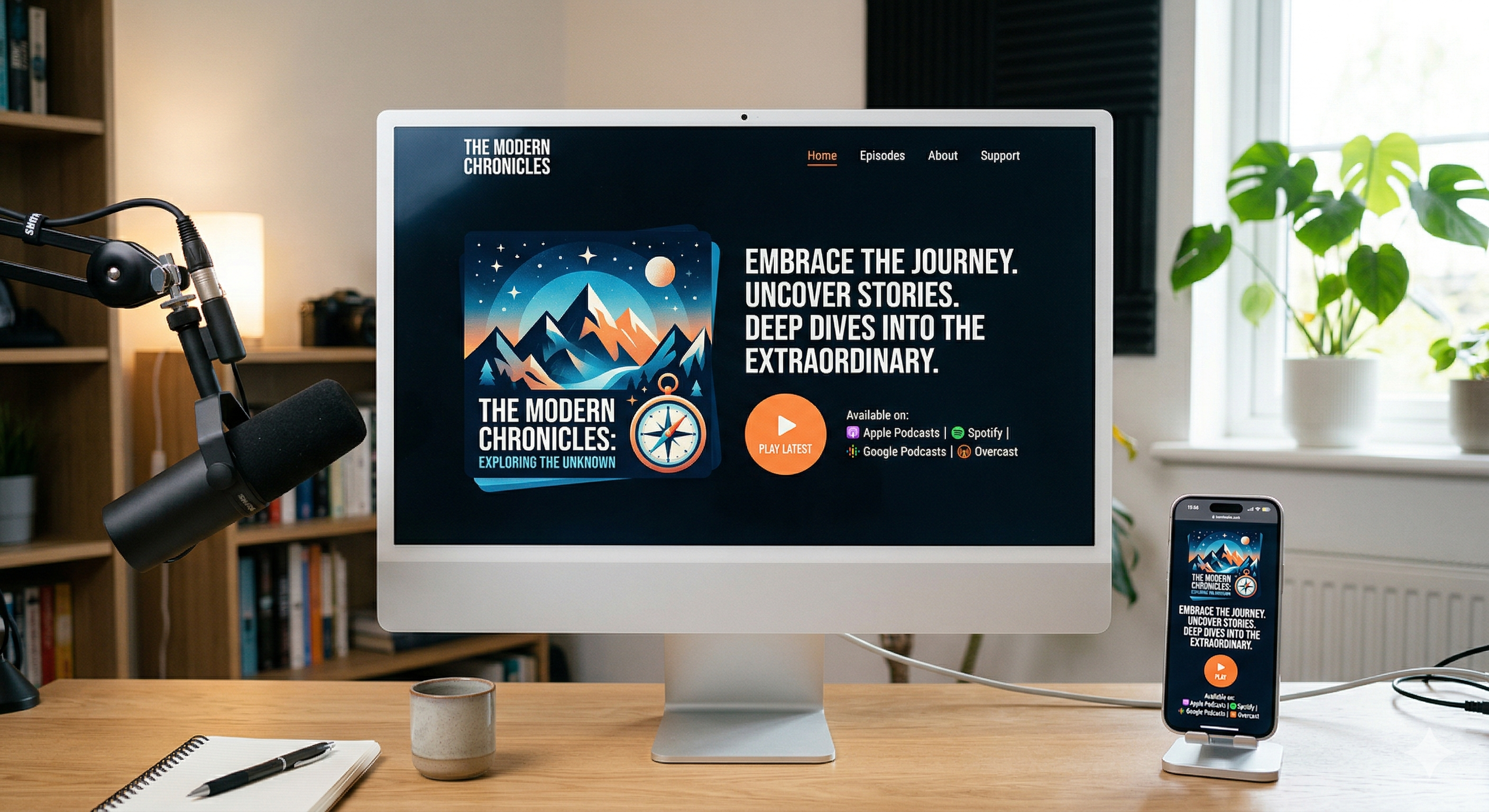
Your homepage is the front door to your podcast. Its job is simple: communicate what your show is about, why someone should listen, and make it effortless to start. Here are the essential components of an effective podcast homepage:
Hero Section
The hero section is the first thing visitors see — the large, visually dominant area at the top of your page. It should include:
- Podcast name and tagline. Immediately communicate what your show is about. Your tagline should answer the question "Why should I listen?" in one sentence.
- Cover art or a compelling visual. Feature your podcast artwork prominently. This creates instant recognition for listeners who found you through a podcast app.
- Primary call-to-action. A prominent "Listen Now" or "Latest Episode" button. Do not make people scroll to find your content — surface it immediately.
- Subscribe buttons. Links to Apple Podcasts, Spotify, and other major platforms. Place them in or near the hero so new visitors can subscribe within seconds of arriving.
Latest Episodes Section
Below the hero, display your most recent episodes with:
- Episode title and number. Make it scannable — visitors should be able to quickly identify what topics you cover.
- Brief description or excerpt. One to two sentences that tease the content. Avoid full show notes here — save those for dedicated episode pages.
- Inline play button. Let visitors sample an episode directly from the homepage without navigating away. Reducing friction is everything.
- Publication date. Shows recency and activity — a podcast that was last updated six months ago raises doubts about whether it is still active.
About Section
A concise section that tells visitors who you are and what the podcast is about. Include a photo of the host or hosts — podcasting is an intimate medium, and putting a face to the voice builds connection. Link to a full about page for the detailed story.
Social Proof
Display listener reviews, press mentions, download milestones, or notable guest appearances. Social proof reduces skepticism and encourages new visitors to invest their time in your show. Even a simple "Featured on Apple Podcasts" badge or "10,000+ downloads" counter can make a difference.
Designing Episode Pages That Keep Listeners Engaged
Episode pages are the workhorse of your podcast website. Each episode page is a standalone landing page that can be discovered through search engines, shared on social media, or linked from your email newsletter. They need to be designed with as much care as your homepage.
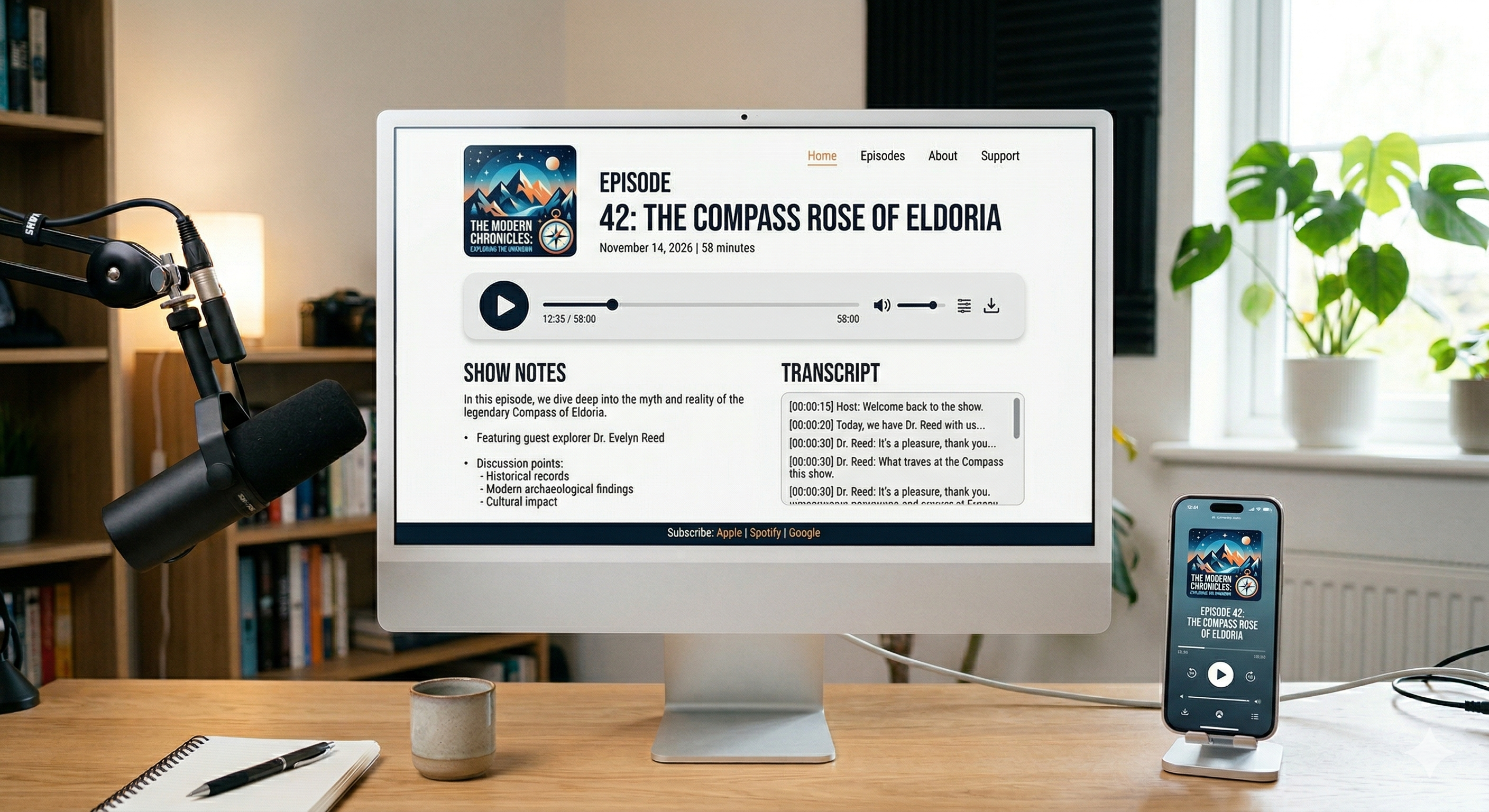
Essential Episode Page Elements
- Prominent audio player. The player should be above the fold — visible without scrolling. Consider a sticky player that follows the user as they scroll through show notes, so they can press play at any point.
- Episode title as an H1 heading. This is critical for SEO. The title should be descriptive and include relevant keywords naturally.
- Structured show notes. Use headings, bullet points, and timestamps to make show notes scannable. Long paragraphs of unformatted text will not get read. For tips on writing effective notes, see our guide on writing podcast show notes.
- Full transcript. Transcripts dramatically improve SEO by giving search engines thousands of indexable words per episode. They also improve accessibility. Learn more about transcribing your podcast.
- Episode-specific artwork. If you create unique artwork for each episode, display it here. If not, use your standard cover art consistently.
- Guest information. For interview episodes, include the guest's name, photo, bio, and links. This is good UX and also helps when guests share the episode with their own audience.
- Related episodes. Link to thematically related episodes at the bottom of the page — this keeps people exploring your catalog instead of leaving after one episode.
Show Notes Design Best Practices
Show notes are one of the most underutilized design opportunities on podcast websites. Instead of dumping a block of text, structure them thoughtfully:
- Timestamped chapters. Use clickable timestamps that jump to specific points in the audio. This helps listeners find the segments that interest them most.
- Key takeaways. Highlight the three to five most important points from the episode in a visually distinct callout box. This serves scanners who want the essence without listening to the full episode.
- Resource links. Organize links mentioned in the episode into a clean, categorized list. Group them under headings like "Books Mentioned," "Tools Referenced," or "Guest Links."
- Pull quotes. Highlight memorable quotes from the episode using styled blockquote elements. These are shareable and break up the visual flow of the page.
Visual Hierarchy and Layout Principles
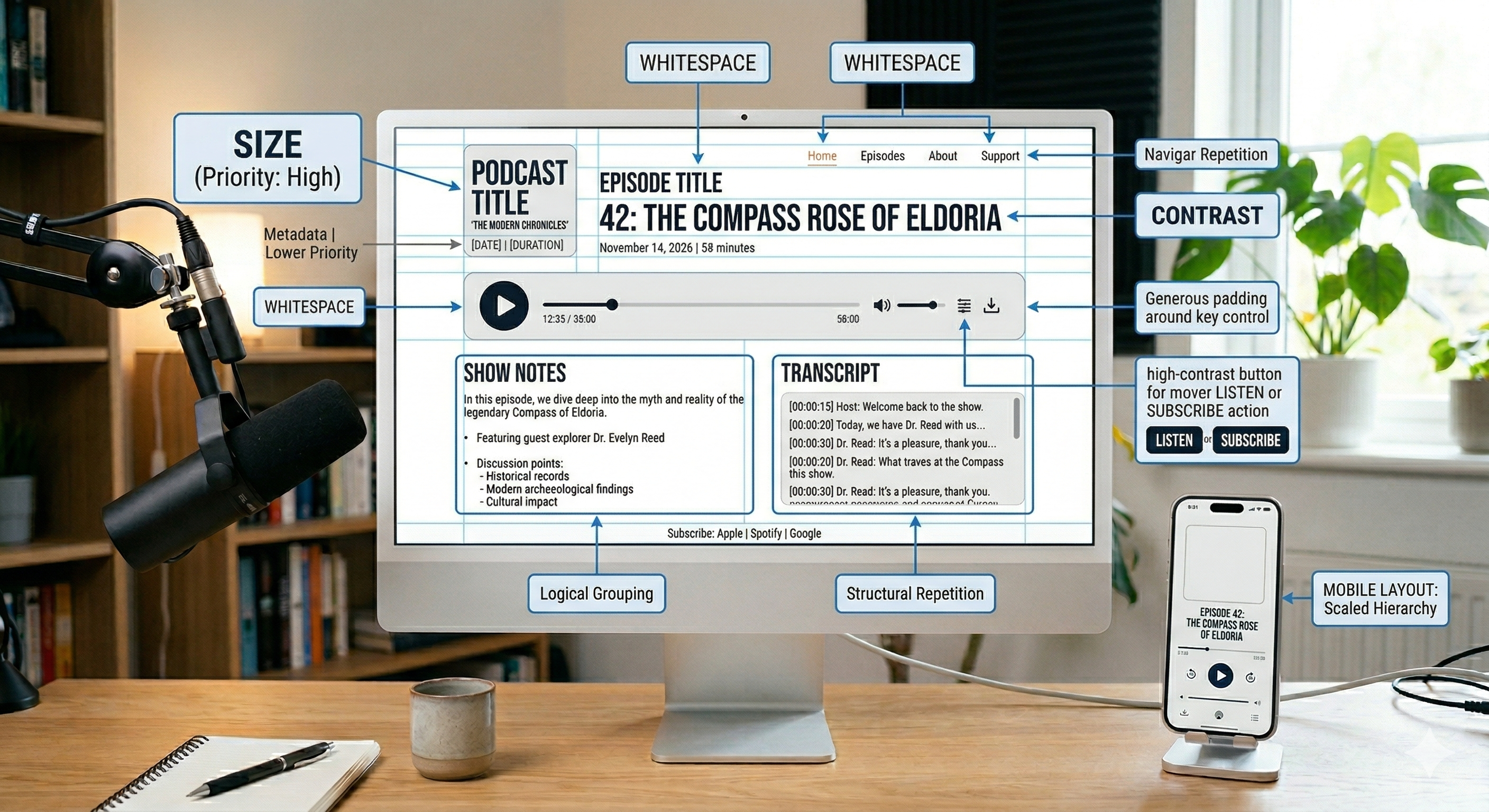
Visual hierarchy is the invisible framework that guides your visitors' eyes through your content in the order you intend. Without it, your page is a visual free-for-all where nothing stands out. Here are the core principles:
Size and Scale
Larger elements attract attention first. Your podcast name, episode titles, and primary CTAs should be the biggest elements on the page. Supporting text — descriptions, dates, metadata — should be noticeably smaller. This size contrast immediately communicates what is important.
Contrast and Color
High contrast draws the eye. Your most important elements — play buttons, subscribe CTAs, navigation links — should have the highest contrast against their background. Use your brand's accent color strategically for CTAs and interactive elements, and keep body text in a neutral, highly readable color.
Whitespace
Whitespace — the empty space between elements — is not wasted space. It is a design tool that creates breathing room, improves readability, and directs attention. Generous whitespace around a CTA button makes it more prominent than adding a border or background color ever could. Many beginning podcast website designers make the mistake of cramming too much content into too little space. Give your elements room to breathe.
Grid and Alignment
Consistent alignment creates order and professionalism. Use a grid system to keep elements aligned — headings, images, buttons, and text blocks should snap to consistent vertical and horizontal lines. Even subtle misalignment creates a subconscious feeling of disorder that undermines trust.
Brand Consistency Across Your Site
Your website is the most complete expression of your podcast brand. Every page should feel like it belongs to the same family — reinforcing your identity with every interaction. Key areas where consistency matters:
- Color palette. Use the same two to three primary colors and one to two accent colors throughout your site. Avoid introducing new colors on individual pages — this fragments your brand.
- Typography. Stick to your chosen headline and body fonts on every page. Consistency in font sizes, weights, and line spacing creates a cohesive reading experience.
- Image style. Whether you use photography, illustrations, or a combination, maintain a consistent visual style. Apply similar filters, color treatments, or framing to all images across your site.
- Tone of voice. The copy on your website should match the tone of your podcast. If your show is conversational and witty, your website copy should be too. If it is authoritative and educational, reflect that in your writing.
- Interactive elements. Buttons, links, hover effects, and form styles should be uniform site-wide. When a button is green on your homepage, it should not be blue on your about page.
Platforms like OnPodium handle brand consistency automatically — set your colors and fonts once, and every page, episode, and component inherits your design system.
Mobile-First Design for Podcasters
More than 60% of web traffic now comes from mobile devices, and for podcast audiences — who are already comfortable consuming audio on their phones — that number is likely even higher. Designing mobile-first is not optional; it is the baseline.
Mobile Design Essentials
- Touch-friendly tap targets. Buttons and links should be at least 44×44 pixels — the minimum comfortable tap size on mobile screens. Tiny links and cramped navigation menus are unusable on phones.
- Readable text without zooming. Body text should be at least 16 pixels on mobile. Headings should scale proportionally. If visitors have to pinch and zoom to read, your design has failed.
- Simplified navigation. Replace complex desktop navigation with a clean hamburger menu on mobile. Limit navigation items to the essentials — Episodes, About, Subscribe, Contact.
- Condensed hero section. Your desktop hero with a large background image and multiple elements needs to stack vertically and simplify on mobile. Prioritize the podcast name, a short tagline, and the play/subscribe buttons.
- Sticky mobile player. A compact audio player fixed to the bottom of the screen lets listeners browse your site while audio plays. This is the standard behavior in podcast apps — replicate it on your website for a familiar experience.
Testing on Real Devices
Browser dev tools can simulate mobile views, but nothing replaces testing on actual phones and tablets. Check your site on at least an iPhone, an Android phone, and a tablet. Pay attention to:
- Do images load quickly on cellular connections?
- Can you easily press play on the audio player?
- Is the navigation menu easy to open and close?
- Does the text read comfortably without zooming?
- Do forms (email signup, contact) work smoothly with mobile keyboards?
Building Immersive Experiences with Scrollytelling
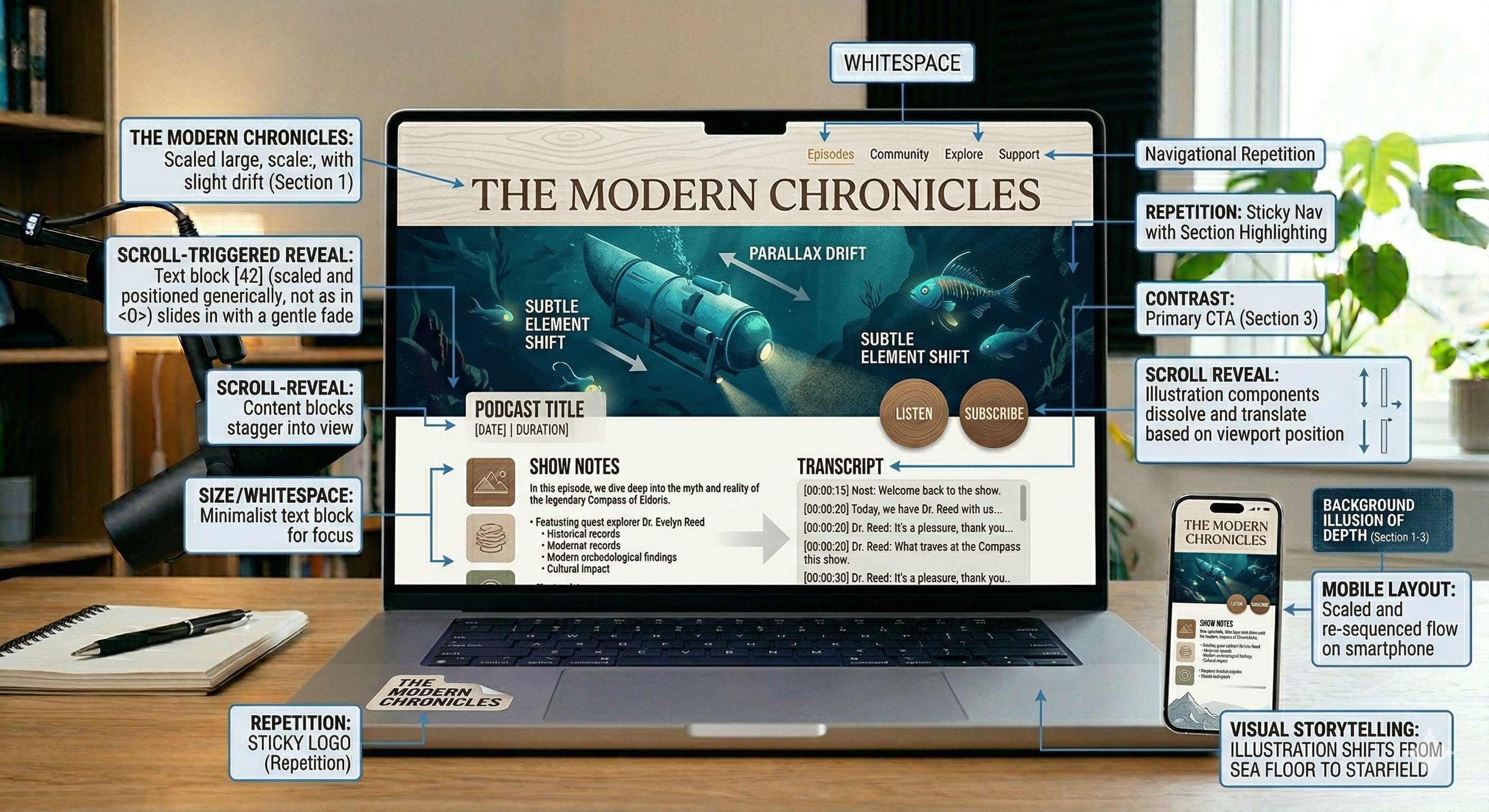
One of the most exciting frontiers in podcast website design is scrollytelling — a design approach where content, visuals, and media are revealed progressively as the user scrolls, creating a cinematic, story-driven experience. While traditional podcast sites present information in static blocks, scrollytelling transforms your website into an immersive narrative journey that mirrors the storytelling power of your audio content.
What Is Scrollytelling?
Scrollytelling combines scroll-triggered animations, parallax effects, embedded media, and sequential content reveals to create a linear narrative experience on a webpage. Instead of presenting all information at once, the page unfolds like a story — each scroll revealing new elements, transitions, and content that guides the visitor through a curated experience.
For podcasters, this is transformational. Your podcast is a story medium. Scrollytelling lets your website mirror that same narrative rhythm — hooking visitors, building interest, and guiding them toward pressing play.
How Platforms Like Scrollytelling.ai Are Changing the Game
Creating immersive scrollytelling experiences used to require custom development, JavaScript libraries, and significant technical expertise. Platforms like Scrollytelling.ai are changing this by making visually rich, scroll-driven content accessible to creators without coding skills.
Here is how podcasters can use scrollytelling tools to elevate their websites:
- Immersive episode landing pages. Instead of a standard page with a player and show notes, create an episode experience. As visitors scroll, they encounter the episode artwork, a brief hook, pull quotes that animate into view, embedded audio clips for key moments, guest photos with animated bios, and a final CTA to listen to the full episode. Each element appears at the perfect moment, creating engagement that static pages cannot match.
- About page as a brand story. Transform your about page from a wall of text into a visual journey. Use scroll-triggered animations to reveal your podcast's origin story, key milestones (first 1,000 listeners, first sponsorship, first live event), host introductions with personality, and your mission statement. This creates an emotional connection that a simple bio paragraph never achieves.
- Season or series introductions. For multi-season podcasts, use scrollytelling to create a teaser page for each new season. Reveal the theme, introduce upcoming guests, show behind-the-scenes imagery, and build anticipation with a countdown or pre-subscribe CTA — all unfolding as the user scrolls.
- Sponsor showcase pages. If you work with sponsors, create professional media kit or sponsor feature pages using scrollytelling. Reveal audience demographics, engagement stats, and testimonials in a visually compelling flow that sells your podcast's value far more effectively than a static PDF.
Scrollytelling Design Tips for Podcasters
- Keep audio context. If your scrollytelling page includes audio clips, make sure they do not auto-play — let the user trigger them. Consider syncing background animation states with audio playback for a truly immersive experience.
- Pace the reveals. Do not trigger too many animations per scroll distance. Give visitors time to absorb each element before introducing the next. The pacing should mirror how your podcast delivers information — methodically, not frantically.
- Ensure mobile compatibility. Some scroll effects that work beautifully on desktop can feel janky or disorienting on mobile. Test your scrollytelling pages extensively on mobile devices and simplify effects where needed.
- Use for key pages, not everywhere. Scrollytelling is most effective on high-impact pages — your homepage, a flagship episode page, or a season launch. Using it on every page dilutes its impact and can slow your site.
- Combine with traditional content. End your scrollytelling experience with standard navigable content — show notes, transcript links, related episodes. The immersive hook draws people in; the structured content gives them what they came for.
Navigation and Information Architecture
How you organize your website's content — and how visitors move through it — is as important as the visual design. Poor information architecture means visitors cannot find what they want, no matter how beautiful your site looks.
Primary Navigation Structure
Keep your main navigation simple and focused. For most podcast websites, these five to six items are sufficient:
- Home — Links to your homepage (often handled by your logo)
- Episodes — A browsable archive of all episodes
- About — Your story, your hosts, your mission
- Subscribe — Links to all major podcast platforms
- Contact — A way for listeners, guests, and sponsors to reach you
- Blog — If you publish articles alongside your podcast (great for SEO)
Resist the temptation to add more. Every additional nav item dilutes focus and creates decision paralysis for visitors.
Episode Archive Design
If you have more than 20 episodes, your archive page needs careful design:
- Search functionality. Let visitors search episodes by keyword — essential for long-running shows with hundreds of episodes.
- Category or topic filters. If your episodes cover different themes, let visitors filter by category. A marketing podcast might have filters for "Social Media," "SEO," "Email Marketing," and "Strategy."
- Season grouping. For seasonal shows, group episodes by season with clear visual separation.
- Load more or pagination. Do not load 200 episodes on a single page. Use "Load More" buttons or pagination to keep page speed manageable.
Embedding and Audio Player Design
The audio player is the single most important interactive element on your podcast website. Its design directly impacts whether visitors actually press play. Here is how to get it right:
- Make it visually prominent. The player should not be a small, generic embed buried in the middle of a page. Style it with your brand colors, make the play button large and obvious, and position it above the fold.
- Include progress tracking. A visual progress bar lets listeners see how far they are into an episode and how much time remains. This is standard in podcast apps and should be standard on your website.
- Show playback speed controls. Many podcast listeners prefer 1.5× or 2× speed. Including speed controls on your web player mirrors the experience they are used to in dedicated podcast apps.
- Persistent/sticky player. A player that stays fixed at the bottom (or top) of the screen as the user navigates your site is the gold standard. Visitors can browse episodes, read show notes, or explore other pages without interrupting playback.
- Episode artwork in the player. Display the episode or podcast artwork within the player. This adds visual richness and reinforces brand recognition.
If you host your podcast with OnPodium, your website comes with a beautifully designed, mobile-responsive audio player that automatically matches your brand — no configuration needed.
SEO-Friendly Design Decisions
Great design and strong podcast SEO are not in conflict — they reinforce each other. Here are design decisions that improve your search engine visibility:
- Semantic HTML structure. Use proper heading hierarchy (H1 for episode titles, H2 for sections, H3 for subsections). Search engines use heading structure to understand your content's organization and relevance.
- Text-based content alongside audio. Search engines cannot listen to your podcast episodes. Every episode page needs substantial text content — show notes, summaries, and ideally full transcripts — for Google to understand and rank.
- Clean URL structure. URLs like
/episodes/how-to-start-investingare far more SEO-friendly than/ep?id=47. Your URL structure should be human-readable and include relevant keywords. - Internal linking. Design your episode pages to link to related episodes, your about page, and relevant blog posts. This internal link structure helps search engines discover and understand the relationship between your content.
- Schema markup. Implement PodcastEpisode and PodcastSeries schema to help Google display rich results for your content. This structured data tells search engines exactly what your content is and how episodes relate to each other.
- Image optimization. Use descriptive alt text on all images, compress images for fast loading, and use modern formats like WebP. Large, unoptimized images slow your site and hurt both user experience and SEO rankings.
Designing for Conversion: CTAs and Email Capture
A beautiful podcast website that does not convert visitors into subscribers is an expensive brochure. Design your site with conversion in mind from the start:
Strategic CTA Placement
- Above the fold. Your primary CTA — whether it is "Listen Now," "Subscribe," or "Start Free Trial" — must be visible without scrolling on both desktop and mobile.
- After value delivery. Place CTAs after sections that deliver value — after a compelling episode description, after a list of benefits, after social proof. People are most likely to act after you have given them a reason to.
- End of page. Always include a CTA at the bottom of every page. Visitors who scroll to the end are highly engaged — do not let them leave without a clear next step.
- Within content. Contextual CTAs embedded naturally in your content (e.g., "Subscribe to get episodes like this every week") convert better than generic sidebar banners.
Email List Design Patterns
Your email list is one of your most valuable assets. Design your email capture forms to maximize signups:
- Offer a lead magnet. A free resource — bonus episode, PDF guide, checklist — dramatically increases signup rates compared to a generic "Subscribe to our newsletter" prompt.
- Minimal form fields. Ask for email only, or email and first name at most. Every additional field reduces conversion rates. You can always collect more information later.
- Visual distinction. Make your email signup form visually distinct from the surrounding content — use a background color, a border, or a card-style container. It should stand out without being disruptive.
- Inline placement. Place signup forms within your content — between episode listings, at the end of blog posts, or in a dedicated section on your homepage. Pop-ups and overlays work but can be annoying on mobile.
Performance and Page Speed
Page speed is a design decision, not just a technical concern. A site that takes more than three seconds to load loses over 50% of visitors. For podcast websites, which often include audio files and images, performance requires deliberate attention:
- Optimize images aggressively. Compress all images, use WebP format, and implement lazy loading so images below the fold do not load until the user scrolls to them.
- Stream audio, do not embed files. Never host raw audio files on your web server. Use a podcast hosting service that streams audio from a CDN — this eliminates the performance impact of large audio files on your site.
- Minimize third-party scripts. Every analytics tool, chat widget, and social embed adds load time. Audit your scripts regularly and remove anything you are not actively using.
- Use a CDN. Serve your website's static assets (CSS, JavaScript, images) from a Content Delivery Network to reduce load times for visitors regardless of their geographic location.
- Limit web fonts. Each custom font file adds to load time. Use two fonts maximum, and load only the weights you actually use (e.g., regular and bold, not all nine weights).
Accessibility in Podcast Website Design
Designing an accessible podcast website is not just ethical — it expands your audience and improves your SEO. Key accessibility considerations:
- Keyboard navigation. Every interactive element — buttons, links, the audio player, forms — must be usable with a keyboard alone. Test by navigating your entire site using only the Tab key and Enter.
- Color contrast. Ensure sufficient contrast between text and background colors. The WCAG 2.1 standard requires a contrast ratio of at least 4.5:1 for normal text. Use a contrast checker tool to verify your color combinations.
- Alt text for images. Every image on your site should have descriptive alt text that conveys the image's content or purpose. Decorative images can use empty alt attributes.
- Transcripts. Providing transcripts for every episode is the single most impactful accessibility improvement a podcast website can make. It serves deaf and hard-of-hearing visitors and also dramatically improves SEO.
- ARIA labels. Use ARIA labels on your audio player controls, navigation toggle, and any non-standard interactive elements so screen readers can describe them to visually impaired visitors.
- Focus indicators. Do not remove the default browser focus outlines on interactive elements. If you customize them, make sure the replacement is equally visible.
Tools and Platforms for Podcast Website Design
The tool you choose to build your podcast website has a massive impact on the quality of your design and the effort required to maintain it. Here is how the options compare:
Dedicated Podcast Website Platforms
OnPodium and similar purpose-built platforms offer the fastest path to a professionally designed podcast website. They provide podcast-specific templates, built-in audio players, automatic episode page generation, and email marketing tools — all designed specifically for podcasters. The key advantage: everything works together out of the box, and your design stays consistent without manual effort.
General Website Builders
Tools like Squarespace and Wix offer beautiful templates, but they are not built for podcasting. You will need to manually configure audio embedding, episode page structure, RSS feed integration, and podcast-specific features. The design can be excellent, but the setup and maintenance overhead is significantly higher. Read our analysis of why WordPress may not be the best option for podcast websites.
Custom Development
For podcasters with access to development resources, a fully custom website offers unlimited design control. Static site generators (like Hugo or Eleventy) combined with a headless CMS can produce blazing-fast sites with any design you can imagine. The trade-off: high initial investment and ongoing technical maintenance.
Immersive Content Tools
For specific high-impact pages, platforms like Scrollytelling.ai can complement your main website. Use them to create visually immersive episode pages, season launches, or media kits that go beyond what standard website builders can produce, then embed or link to them from your primary site.
Podcast Website Design Examples and Inspiration
Studying well-designed podcast websites is one of the best ways to develop your design instincts. Here are patterns commonly seen in the best podcast website designs:
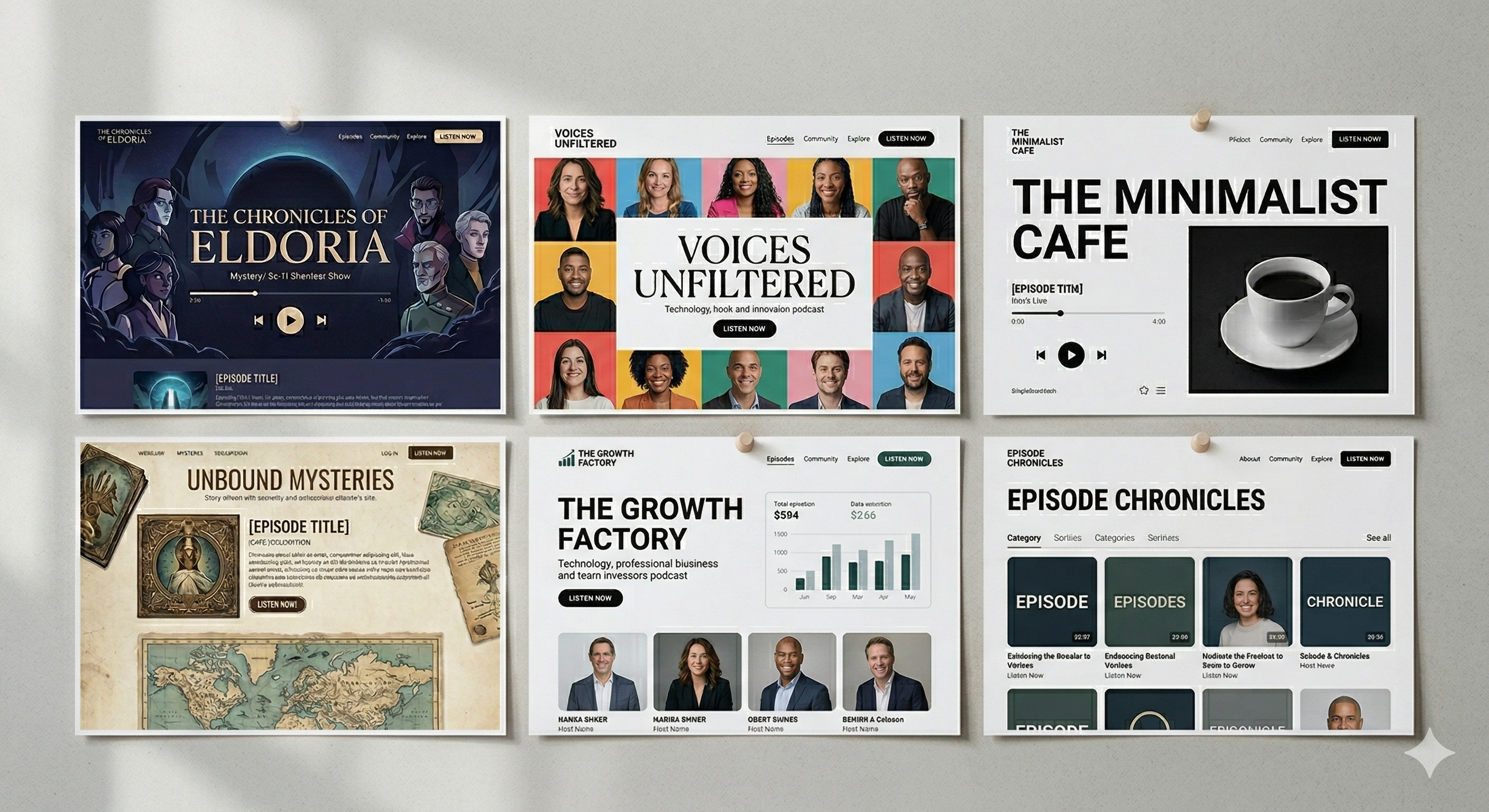
- Bold, simple homepages. The best podcast sites keep their homepages focused — large cover art, a clear tagline, and an immediate path to listen. They resist the urge to put everything above the fold.
- Consistent visual language. Top-tier sites maintain perfect consistency in colors, fonts, and spacing across every page. You never feel like you have accidentally navigated to a different website.
- Generous whitespace. High-end podcast websites use ample whitespace to create a premium feel. The content breathes, the design feels intentional, and nothing is cluttered.
- Episode-first architecture. The most successful podcast sites make episodes the star — they are easy to find, easy to play, and easy to explore. Everything else supports that core purpose.
- Personality through design details. Custom illustrations, unique scroll animations, branded hover effects, and distinctive typography choices give the best sites personality beyond their template. It feels like the website a human designed, not a machine generated.
For a curated collection of real podcast websites to study, check out our guide to the best podcast website examples and templates.
Common Podcast Website Design Mistakes
Avoid these frequent design pitfalls that undermine even good podcast websites:
- Burying the audio player. If a visitor has to scroll or navigate to find the play button, you have already lost them. The player should be one of the first things they see.
- No mobile optimization. A desktop-only design in 2026 is unacceptable. If your site is not responsive, you are losing the majority of your potential visitors.
- Too many fonts and colors. Using five different fonts and ten colors does not look creative — it looks chaotic. Stick to two fonts and three to four colors maximum.
- Generic stock photography. Stock photos of people wearing headphones do not add value to your site. Use original photography, custom illustrations, or your actual podcast artwork.
- Missing subscribe links. Every page should include a clear path to subscribe on the visitor's preferred podcast platform. Do not assume people will find your Apple Podcasts page on their own.
- Outdated content signals. If your homepage still shows an episode from six months ago, or your footer says "Copyright 2023," visitors will assume the podcast is abandoned. Keep everything current.
- Ignoring page speed. A beautiful site that takes seven seconds to load is worse than a plain site that loads in one. Speed is a design quality.
- No clear calls to action. A site that lets visitors browse endlessly without asking them to subscribe, listen, or sign up is leaving engagement on the table.
- Skipping SEO foundations. Designing a visually stunning site that ignores heading structure, meta descriptions, and schema markup is building a beautiful house with no address. Search engines need structure to find and rank your content.
Ready to build a podcast website that looks and performs at its best? Start free with OnPodium — get a beautifully designed, mobile-optimized podcast website with built-in hosting, email tools, and audience growth features. No coding or design skills needed.